Mineuniverse
Data Packs
Coords & Days

Coords & Days

DATA PACK
Datapack that adds coords and days in left-top corner of the game.
by FuzjaJadrowa
Download Claim this project
123 downloads
0 likes
Updated Oct 14, 2026
0 hypes
Utility
Advertisement Remove ads with Premium →

Coords & Days logo

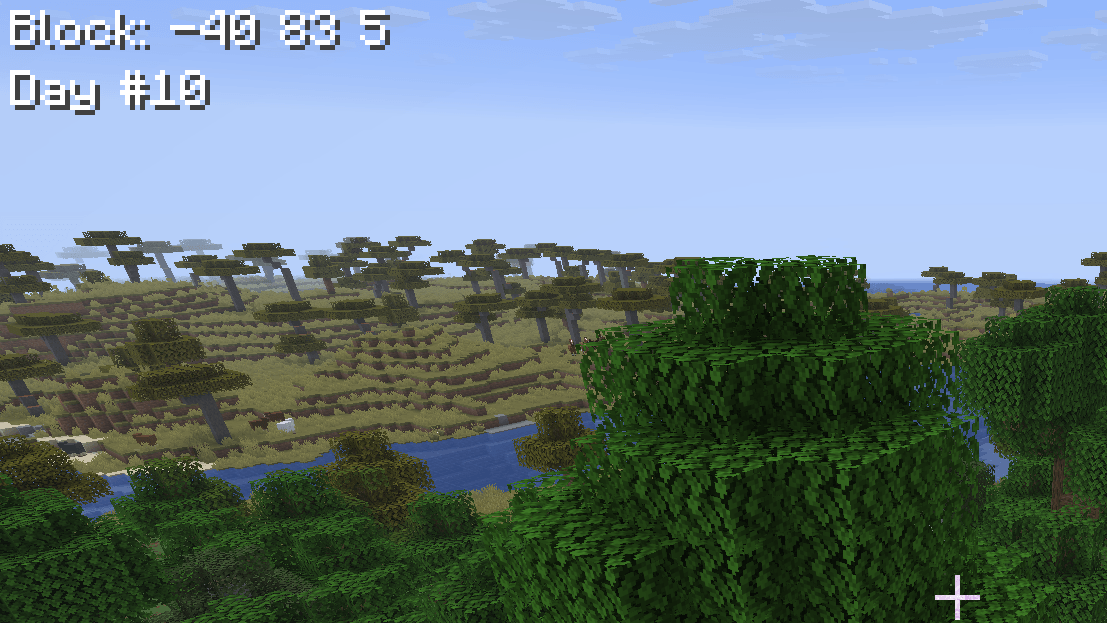
A combined Minecraft datapack and resourcepack that displays your current coordinates and day count on the left-top corner.

WARNING! Resourcepack is required for correct datapack working!

Features

  • Shows synced player position coordinates.
  • Shows actual world day count.
  • Thanks for the VSH shaders and negative spaces in the resourcepack, the datapack perfectly alignes actionbar to the left-top corner.

Datapack Installation

  1. Download CoordsAndDays-pack.zip.
  2. Copy this ZIP into .minecraft/resourcepacks and activate it in options.
  3. Copy the same ZIP into the selected world's datapacks folder.
  4. Join the world. The datapack is now installed and ready to use.
1.1.0
MC 26.2, 26.3
Release 2026-10-10 Get
1.0.0
MC 26.2
Release 2026-08-27 Get

Requirements & install

How to use this data pack in Minecraft
Mods needed
None, works in vanilla
Minecraft
26.2 – 26.3
Install folder
saves/<world>/datapacks

How to install data packs

  1. Download the data pack .zip file (do not extract it).
  2. New world: click Data Packs on the world creation screen and drop the .zip in. Existing world: open .minecraft/saves/<world>/datapacks.
  3. Put the .zip into the datapacks folder of the world (servers: world/datapacks).
  4. Run /reload in game (or rejoin the world) and check it with /datapack list.
Browse more: Data Packs for 26.3 All data packs

More from FuzjaJadrowa

Advertisement Remove ads with Premium →

You Might Also Like