Mineuniverse
Data Packs
🐤Cluckin' CHICKS🐔

🐤Cluckin' CHICKS🐔

DATA PACK
Add some new variants for chickens, new eggs & fried egg food
by iam_markis
Download Claim this project
218 downloads
0 likes
0 followers
Updated Oct 14, 2026
0 hypes
Follow0
Miscellaneous Utility
Advertisement Remove ads with Premium →

Cluckin Chicks title :u

Cluckin Chicks data pack gives new custom variants to chicken
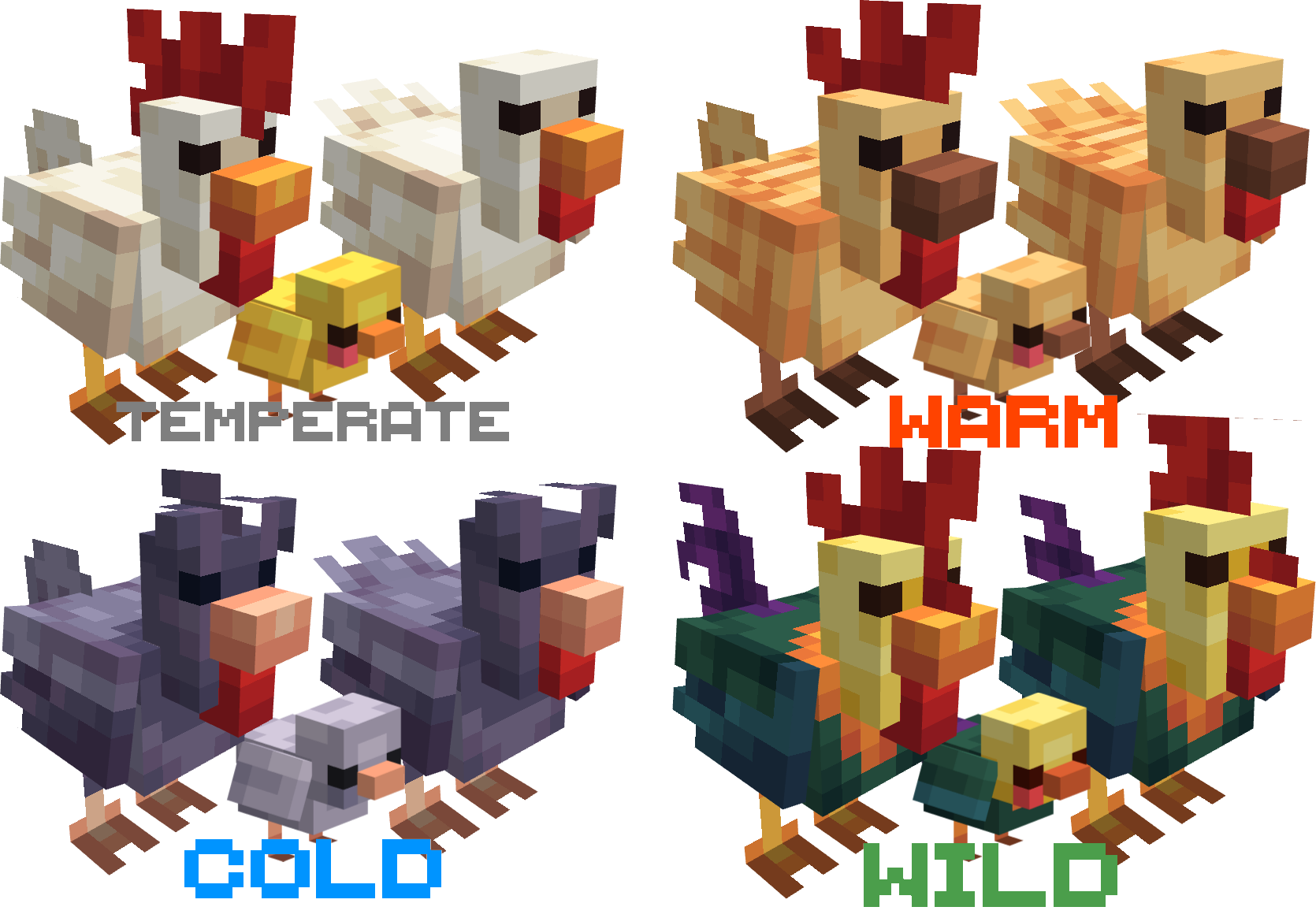
 

  • Requires the RESOURCE PACK: Cluckin' CHICKS
  • Adds tails to temperate and warm chicken (when not using EMF/Optifine)
  • Adds Eggs for all custom variants
  • Adds Fried Egg Food
  • Compatible with CLUCKING DUCKS datapack (so it means, duck variant is possible)

1.0/+ CHICKENS 1.2/+ CHICKENS

<details open=""> <summary>More Info</summary> Fried Egg: Cooks slightly faster than other items, also can be eaten pretty quick (1 second) 3 Nutrition (1.5 Hunger bar points) ~ 2 Saturation ~ Stackable to 64</details><details open=""> <summary>CHICKEN WIKI</summary>
TYPE Where to find Egg Type
White/Yellow Chick Temperate Biomes Vanilla Egg
Orange/Brown Warm Biomes Vanilla Brown Egg
Blue/Gray Cold Biomes Vanilla Blue Egg
Wild Chicken Jungle Biomes CUSTOM Wild Egg
Raven Chicken Dark Forest/Pale Garden CUSTOM Black Egg
Cluckshroom Chicken Mushroom Fields CUSTOM EggShroom
</details>

Check my other Packs:

• Datapack made by itsMarkiS • @Markis_ArtS

🐔ClukinCHICKS🐤 DATAPACK 1.3
MC 1.21.6-snapshot, 1.21.8, 1.21.5, 1.21.6, 1.21.7, 1.21.9-snapshot, 1.21.9, 1.21.10, 1.21.11-snapshot, 1.21.11, 26.1, 26.1.1, 26.1.2, 26.2
Release 2026-07-20 Get
🐔ClukinCHICKS🐤 DATAPACK 1.2
MC 1.21.6-snapshot, 1.21.8, 1.21.5, 1.21.6, 1.21.7, 1.21.9-snapshot, 1.21.9, 1.21.10, 1.21.11-snapshot, 1.21.11, 26.1, 26.1.1, 26.1.2, 26.2
Release 2026-06-24 Get

Requirements & install

How to use this data pack in Minecraft
Mods needed
None, works in vanilla
Minecraft
1.21.9 – 26.2
Install folder
saves/<world>/datapacks

How to install data packs

  1. Download the data pack .zip file (do not extract it).
  2. New world: click Data Packs on the world creation screen and drop the .zip in. Existing world: open .minecraft/saves/<world>/datapacks.
  3. Put the .zip into the datapacks folder of the world (servers: world/datapacks).
  4. Run /reload in game (or rejoin the world) and check it with /datapack list.
Browse more: Data Packs for 26.2 All data packs

More from iam_markis

Advertisement Remove ads with Premium →

You Might Also Like