Mineuniverse
Data Packs
Cleannrooster's Skill Tree

Cleannrooster's Skill Tree

DATA PACK
Skill Tree (Web) For Pufferfish's Skills! Supports Spell Attributes and more!
by cleannrooster
Download Claim this project
160,143 downloads
0 likes
0 followers
Updated Oct 14, 2026
0 hypes
Follow0
Magic Mod Support
Advertisement Remove ads with Premium →

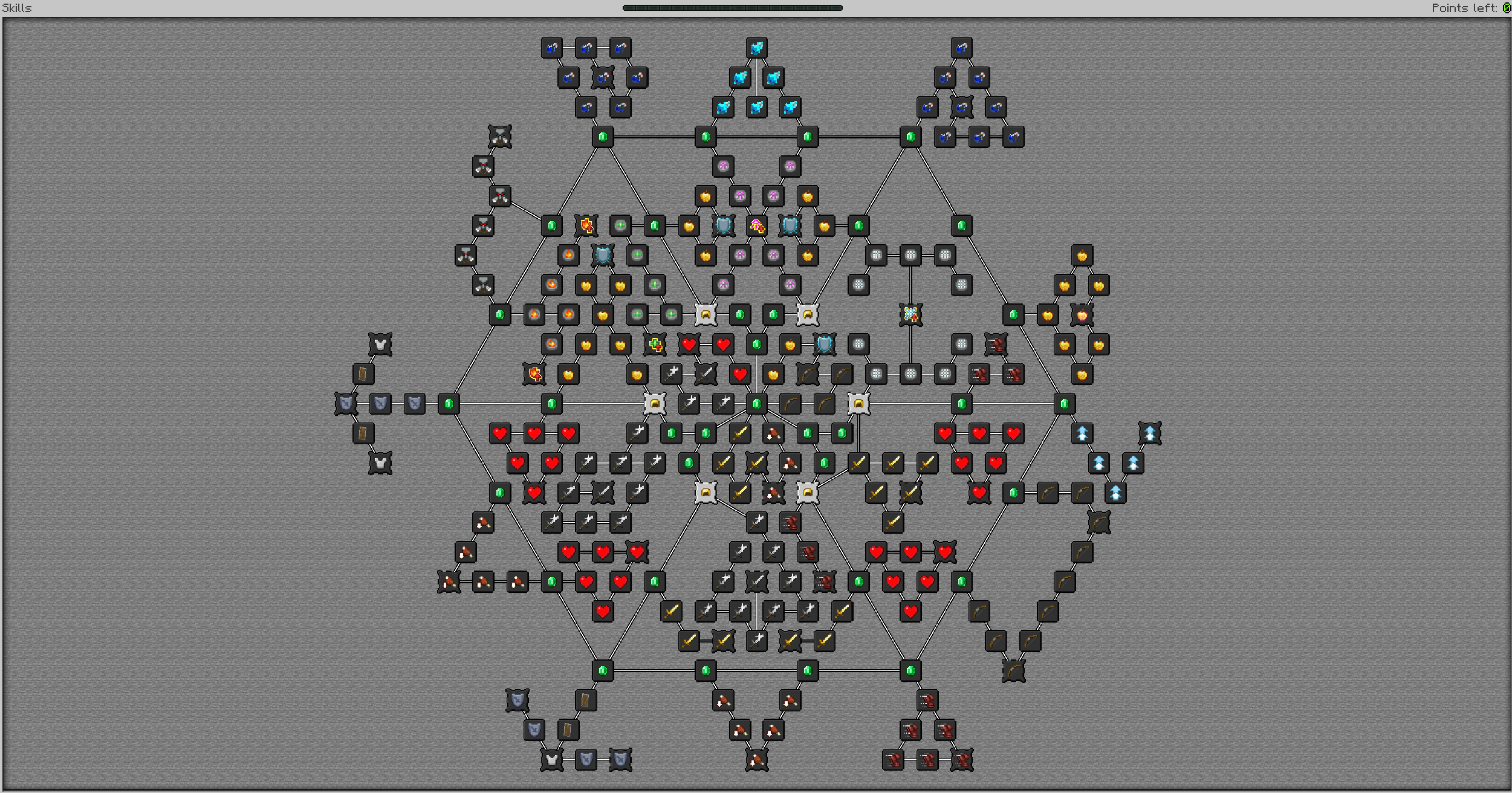
As of 1.21.1, the skill tree is vastly different.

It offers a smaller, sleeker experience with less clutter.

The Aspirant node gives you the following:

6 generic spell power (3 for healing), -40% generic spell power. 50% crit damage. 5% crit chance. 5 attack damage. -40% attack damage. 6 ranged damage. -40% ranged damage.

I HIGHLY SUGGEST CHANGING THIS FOR YOUR OWN EXPERIENCE. THIS WAS MADE WITH MY MODPACK IN MIND.

The purpose of the flat additions and % reductions is to reduce insane scaling, while providing more damage for people early game.

1 Physique gives the following: 5% max health. 5% armor. 5% attack damage. 1 toughness shred.

1 Finesse gives the following: 5% Spell Suppression. 5% Chance to evade. 5% attack speed. 5% ranged damage. 1 armor shred.

1 Attunement gives the following: 5% generic spell damage. 1% crit chance. 5% crit damage. 0.5 Protection shred.


Legacy Skill Tree: No Support
cleanntree_1.21.1_v3.zip
MC 1.21, 1.21.1
Release 2025-07-08 Get
cleanntree_1.21.1_v2.zip
MC 1.21.1
Release 2025-07-01 Get
cleanntree_1.21.1_directors_cut_hf.zip
MC 1.21, 1.21.1
Release 2025-05-30 Get
cleanntree_1.21.1_directors_cut.zip
MC 1.21, 1.21.1
Release 2025-05-29 Get
cleanntree_1.21.1.zip
MC 1.21, 1.21.1
Release 2025-05-13 Get
cleanntree_1.21.1_hf1.zip
MC 1.21, 1.21.1
Release 2025-05-13 Get
cleannrooster_tree_1.0.3.zip
MC 1.20.1
Release 2024-06-30 Get
cleannrooster_tree_1.0.0.zip
MC 1.20.1
Release 2024-06-28 Get
cleannrooster_tree_1.0.1.zip
MC 1.20.1
Release 2024-06-28 Get
cleannrooster_tree_1.0.2.zip
MC 1.20.1
Release 2024-06-28 Get
Tree v1
MC 1.20.1
Release 2024-06-28 Get

Requirements & install

How to use this data pack in Minecraft
Mods needed
None, works in vanilla
Minecraft
1.20.1 – 1.21.1
Install folder
saves/<world>/datapacks

How to install data packs

  1. Download the data pack .zip file (do not extract it).
  2. New world: click Data Packs on the world creation screen and drop the .zip in. Existing world: open .minecraft/saves/<world>/datapacks.
  3. Put the .zip into the datapacks folder of the world (servers: world/datapacks).
  4. Run /reload in game (or rejoin the world) and check it with /datapack list.
Browse more: Data Packs for 1.21.1 All data packs

More from cleannrooster

Advertisement Remove ads with Premium →

You Might Also Like