Mineuniverse
Data Packs
Call Your Horse

Call Your Horse

DATA PACK
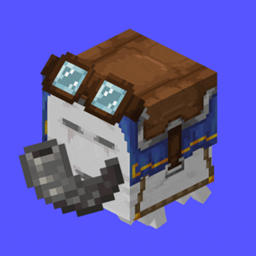
Easily call (whistle) your horse with a goat horn to teleport it to you
by Jodek
Download Claim this project
Add a badge to your pageLink to Call Your Horse from a README, website or forum post.
Preview: Badge

Badges update automatically and link to the data pack page on MineUniverse.

5,132 downloads
0 likes
0 followers
Updated Oct 14, 2026
0 hypes
Follow0
Adventure Magic Miscellaneous Tech Utility
Advertisement Remove ads with Premium →

minecraft datapack call your horse whistel horse minecraft mod

jodeks discord - discord badge - pixel badge - pixel discord badge - jodeks datapacks - datapacks discord   datapacks jodek youtube   armor stand arms minecraft datapack codeberg issues   jodeks datapacks kofi - jodek kofi - minecraft datapack kofi donation

jodeks library - 5555ff lib is required  

Easily call your horse with a goat horn whenever you need it

The horse can be anywhere, it always works to teleport it to you, even in unloaded chunks

How it works

1. Tame a horse

2. Give the horse any name (it can not include special characters like # ' _ or spaces)

3. Hold any goat horn you want in your hand

4. Sneak and look at the horse for 4 seconds

4. You will then get a horn that looks enchanted and has the name of the horse

5. Whenever you use the horn, it will teleport to you

--> Only the owner of the horse can get the goat horn + use the goat horn to call the horse (you can change that with the config)

--> To unbind/reset the horn, sneak + look directly up


Works for horses, donkeys, llamas, mules, skeleton horses, zombie horses, trader llamas and camels by default

Config

/trigger callyourhorse.config

Features

  • Change what horses should by callable without an owner
  • Select if teleporting only works if there's no player on the horse (enabled by default)
  • Select if the player should automatically mount the horse after teleporting it (disabled by default)

Showcase

Embed Removed: https://www.youtube-nocookie.com/embed/7kVfUDHsRTM

Config for 1.21.5 and below

After you've changed anything, you have to run /reload in the game for it to work

To change what entities can be called:

go to

root/data/callyourhorse/tags/entity_type/callable.json

and add or remove the entities you want to be callable

To change if an entity should be callable wihtout a player needing to be the owner:

go to

root/data/callyourhorse/tags/entity_type/callable_without_owner.json

and add or remove the entities you want to be callable without an owner

Bugs & Incompatibilities

  • There's currently a bug (should be fixed in 1.21), where if the horse you want to call is too far away it will be invisible after the teleport --> to fix that you have to rejoin the game
call-your-horse-v2.2.0.0
MC 26.3
Release 2026-09-28 Get
call-your-horse-v2.2.0
MC 26.3
Release 2026-09-23 Get
Call-Your-Horse v2.1.3
MC 1.21.8, 1.21.6, 1.21.7, 1.21.9, 1.21.10, 1.21.11, 26.1, 26.1.1, 26.1.2, 26.2
Release 2026-08-08 Get
Call-Your-Horse v2.1.2
MC 1.21.8, 1.21.6, 1.21.7, 1.21.9, 1.21.10, 1.21.11, 26.1, 26.1.1, 26.1.2, 26.2
Release 2026-06-30 Get
Call-Your-Horse v2.1.1
MC 1.21.8, 1.21.6, 1.21.7, 1.21.9, 1.21.10, 1.21.11, 26.1, 26.1.1, 26.1.2, 26.2
Release 2026-06-24 Get
Call-Your-Horse v2.1.0
MC 1.21.8, 1.21.6, 1.21.7, 1.21.9, 1.21.10, 1.21.11, 26.1, 26.1.1, 26.1.2, 26.2
Release 2026-06-17 Get
Call-Your-Horse v2.0.3
MC 1.21.8, 1.21.6, 1.21.7, 1.21.9, 1.21.10, 1.21.11, 26.1, 26.1.1, 26.1.2
Release 2026-04-22 Get
Call-Your-Horse v2.0.2
MC 1.21.8, 1.21.6, 1.21.7, 1.21.9, 1.21.10, 1.21.11, 26.1, 26.1.1, 26.1.2
Release 2026-04-21 Get
Call-Your-Horse v2.0.1
MC 1.21.8, 1.21.6, 1.21.7, 1.21.9, 1.21.10, 1.21.11, 26.1
Release 2026-04-09 Get
Call-Your-Horse 2.0.0
MC 1.21.8, 1.21.6, 1.21.7, 1.21.9, 1.21.10, 1.21.11, 26.1
Release 2026-04-08 Get
Call-Your-Horse v1.6.4
MC 1.21.8, 1.21.6, 1.21.7, 1.21.9, 1.21.10, 1.21.11, 26.1
Release 2026-03-26 Get
Call-Your-Horse v1.6.3
MC 1.21.8, 1.21.6, 1.21.7, 1.21.9, 1.21.10, 1.21.11
Release 2026-03-08 Get
Call-Your-Horse v1.6.2
MC 1.21.8, 1.21.6, 1.21.7, 1.21.9, 1.21.10, 1.21.11
Release 2026-01-11 Get

Requirements & install

How to use this data pack in Minecraft
Mods needed
None, works in vanilla
Minecraft
1.21.9 – 26.3
Install folder
saves/<world>/datapacks

How to install data packs

  1. Download the data pack .zip file (do not extract it).
  2. New world: click Data Packs on the world creation screen and drop the .zip in. Existing world: open .minecraft/saves/<world>/datapacks.
  3. Put the .zip into the datapacks folder of the world (servers: world/datapacks).
  4. Run /reload in game (or rejoin the world) and check it with /datapack list.
Browse more: Data Packs for 26.3 All data packs

More from Jodek

Advertisement Remove ads with Premium →

You Might Also Like