Resource Pack needed, check installation below for details.
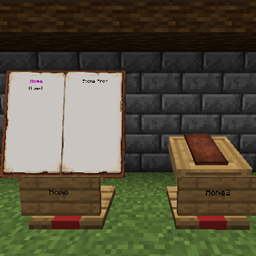
A global portal system using books(not the ingame item or GUI, a custom in world display) allowing the dynamic creation of portals anywhere in the overworld.
All you have to do is craft a Portal Core(1 enderpearl and 1 copper ingot), place a sign on the front of a lectern with the second line being the name you want for this portal and then drop the Portal Core onto the lectern.
Features:
- Doesn't use chunk loaders
- If someone removes a portal while the book is open it waits until there is no player nearby before it updates to prevent misclicks
- Theoretically the max portal count should be around 2,000,000(due to using scoreboard to hold values)
- No commands needed by the users so it is noob friendly
How it works:
- Craft a copper bar and an enderpearl to create a Portal Core
- Put a sign on the front of a lectern with the second line becoming the name of the portal
- Throw the core onto the lectern
- Right click the book on the lectern to open the menu
- Right click the portal name in the book to teleport
Installation:
- Download the main file "GroxicBookTP.zip" and place it into your world datapacks folder.
- Download the "GroxicPortalsResourcePack.zip" and put it into your resources folder, make sure to enable this ingame.
Link: https://www.curseforge.com/minecraft/data-packs/book-portals-by-groxictinch/files/6092252
How to find it: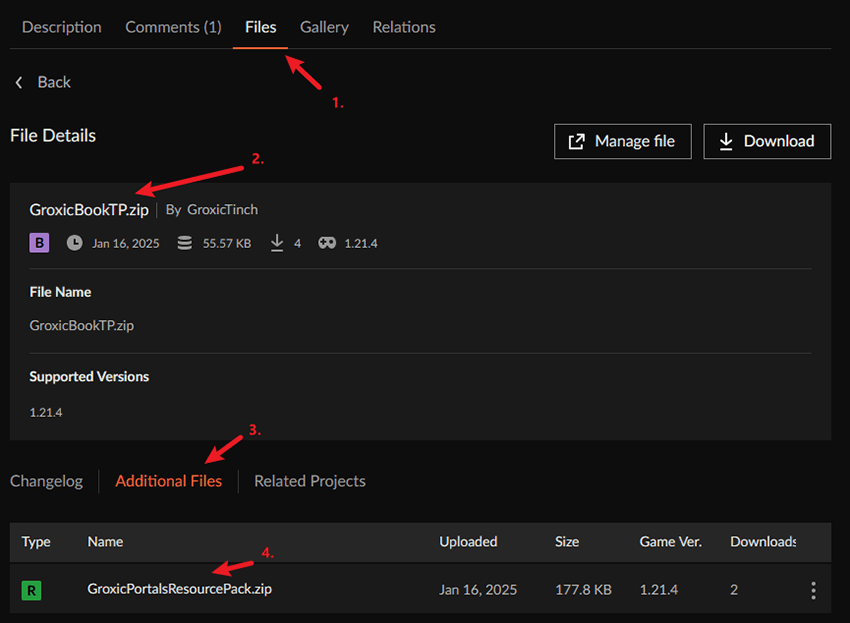
Credits:
Huge credit to Warp Portals - Portal teleportation by gabriel_pinheiro on here. I learnt datapacks from scratch by checking out the code in his datapack. Thanks to the people over at reddit for the help when I wasn't sure how to do something!