Mineuniverse
Data Packs
Better Blast Furnace

Better Blast Furnace

DATA PACK
A Data pack for Minecraft that allows the same smelting as the normal furnace but faster.
by CaptainJaySolo
Download Claim this project
Add a badge to your pageLink to Better Blast Furnace from a README, website or forum post.
Preview: Badge

Badges update automatically and link to the data pack page on MineUniverse.

97 downloads
0 likes
0 followers
Updated Oct 14, 2026
0 hypes
Follow0
Miscellaneous Utility
Advertisement Remove ads with Premium →

What does this Data Pack do?

The function of this data pack simply turns the Blast Furnace into an improved furnace. It contains the same functions as a furnace.. just faster.

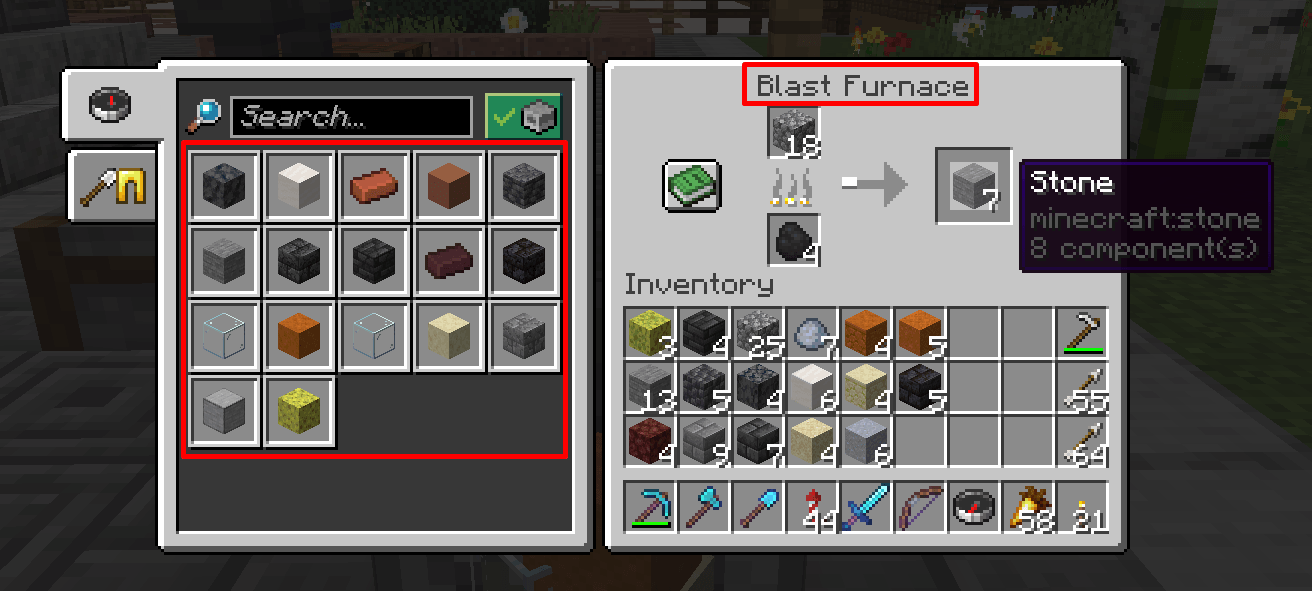
The Blast furnace will allow the smelting of the following;

  • Cobblestone > Stone
  • Stone > Smoothstone
  • Wet Sponge > Dry Sponge
  • Clay Ball > Brick
  • Stone Brick > Cracked Stone Brick
  • Sand / Red Sand > Glass
  • Clay > Trracotta
  • Netherrack > Nether Brick
  • Cobble Deepslate > Deepslate
  • Deepslate Bricks > Cracked Deepslate Bricks
  • Deepslate Tiles > Cracked Deepslate Tiles
  • Sandstone > Smooth Sandstone
  • Red Sandstone > Smooth Red Sandstone
  • Basalt > Smooth Basalt
  • Polished Blackstone Bricks > Cracked Polished Blackstone Bricks
  • Block of Quartz > Smooth Quartz
  • All 16 Terracotta colours > Glazed Terracotta colours
  • Sea Pickle > Lime Dye
  • Cactus > Green Dye
  • Chorus Fruit > Popped Chorus Fruit


I initially created this data pack for a better QoL for my One Block world in version 1.21.3 Java version to allow for a slightly improved smelting speed.


To install this data pack, it's the same process as applying any other data pack to your server.

If not using the Curseforge App:

Simply create a folder in your server's "Datapack" folder and unzip the contents of this data pack there.

Restart your server and the data pack should be applied.


If on a local single player world, the default location for data packs is here;

 %appdata% > .minecraft > saves > "WorldName" > datapacks


BBF Logo

Better_Blast_Furnace_v1.0.zip
MC 1.21.3
Release 2025-02-18 Get
Better_Blast_Furnace_v1.1.zip
MC 1.21.3
Release 2025-02-18 Get

Requirements & install

How to use this data pack in Minecraft
Mods needed
None, works in vanilla
Minecraft
1.21.3
Install folder
saves/<world>/datapacks

How to install data packs

  1. Download the data pack .zip file (do not extract it).
  2. New world: click Data Packs on the world creation screen and drop the .zip in. Existing world: open .minecraft/saves/<world>/datapacks.
  3. Put the .zip into the datapacks folder of the world (servers: world/datapacks).
  4. Run /reload in game (or rejoin the world) and check it with /datapack list.
Browse more: Data Packs for 1.21.3 All data packs
Advertisement Remove ads with Premium →

You Might Also Like