Mineuniverse
Data Packs
Auri's Extras

Auri's Extras

DATA PACK
Auri's Extras is a collection of simple, intuitive crafting recipes that blend seamlessly with Vanilla Minecraft. Each addition fills a small gap — the kind you didn’t know you needed until it was there. No fluff, just the quality-of-life tweaks that make
by HeyItsAurin
Download Claim this project
253 downloads
0 likes
Updated Oct 14, 2026
0 hypes
Miscellaneous Utility
Advertisement Remove ads with Premium →

Description

Auri's Extras is a collection of simple, intuitive crafting recipes that blend seamlessly with Vanilla Minecraft. Each addition fills a small gap — the kind you didn’t know you needed until it was there. No fluff, just the quality-of-life tweaks that make crafting feel complete.

Recipes:

- Coal to Black Dye
- Smelt/Blast Full Quartz Block Variants back into the Basic Quartz Block
- Unpack Blue Ice
- Unpack Packed Ice
- Unpack Dripstone
- Unpack Nether Wart Blocks
- Unpack Wool into String
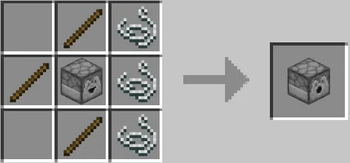
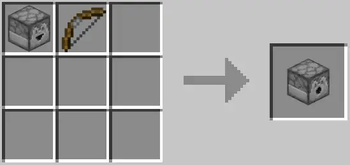
- Alternative Dispenser Recipes
- Alternate Chest Recipe
- Renewable Sand
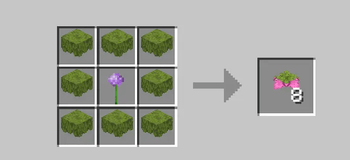
- Spore Blossom Recipe
- Name Tag Recipe
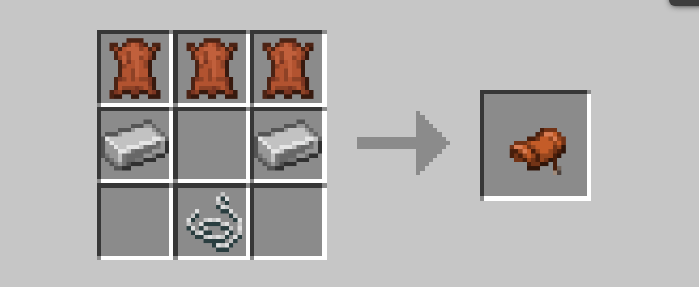
- Saddle Recipe
- Rotten Flesh to Leather - Uses a Campfire/Soul Campfire
- Raw Ore Block Smelting
- Alternate Powered Rail Recipe


  **All Recipes can be found in the Gallery Section**


Please Report any Bugs to the Auris Extras Channel in my discord.

Auris_Extras_1.1.2.zip
MC 1.21.9, 1.21.10, 1.21.11, 26.1, 26.1.1, 26.1.2, 26.2
Release 2026-07-19 Get
Auris_Extras_1.1.1.zip
MC 1.21.9, 1.21.10, 1.21.11, 26.1, 26.1.1, 26.1.2, 26.2
Release 2026-07-13 Get
Auris_Extras_1.21.9-26.1.2.zip
MC 1.21.9, 1.21.10, 1.21.11, 26.1, 26.1.1, 26.1.2, 26.2
Release 2026-06-17 Get

Requirements & install

How to use this data pack in Minecraft
Mods needed
None, works in vanilla
Minecraft
1.21.9 – 26.2
Install folder
saves/<world>/datapacks

How to install data packs

  1. Download the data pack .zip file (do not extract it).
  2. New world: click Data Packs on the world creation screen and drop the .zip in. Existing world: open .minecraft/saves/<world>/datapacks.
  3. Put the .zip into the datapacks folder of the world (servers: world/datapacks).
  4. Run /reload in game (or rejoin the world) and check it with /datapack list.
Browse more: Data Packs for 26.2 All data packs

More from HeyItsAurin

Advertisement Remove ads with Premium →

You Might Also Like