Mineuniverse
Data Packs
ATP Safe Creeper

ATP Safe Creeper

DATA PACK
No creeper griefing and other settings
by DreamyBlaze
Download Claim this project
4,741 downloads
0 likes
0 followers
Updated Oct 14, 2026
0 hypes
Follow0
Utility
Advertisement Remove ads with Premium →

ATP Safe Creeper

ATP友好苦力怕 数据包

(Languages adjustable: Chinese or English)

Link:Github MCMOD CurseForge Modrinth

Usage

How to install a datapack? Link: MinecraftWiki MC中文wiki

Execute the following commands in-game:

/function safe_creeper:atp_sc

After opening the menu, clicking the option text below will copy the corresponding command to the chat bar (scoreboard).
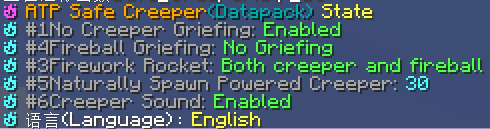
setting

Functions

The mobGriefing gamerule controls mob-block interactions, but disabling it doesn't just prevent creeper terrain damage - it also affects most other mobs' behaviors, including villagers' farming activities. Therefore, when "Creeper Terrain Protection" is enabled, the mobGriefing rule will remain active.

Additionally, the following features are configurable:

  • Ghast Fireball Terrain Protection (Prevents ghast fireballs from destroying blocks)
  • Creeper Explosion Fireworks (Replaces explosions with firework displays)
  • Ghast Fireball Fireworks (Converts ghast attacks into visual fireworks)
  • Natural Creeper Sounds (Uses hurt sounds for ambient creepers)
  • Powered Creeper Spawning (Customizable spawn chance 0-100%)
ATP-safe_creeper 1.21-26.x.zip
MC 1.21, 1.21.8, 1.21.5, 1.21.4, 1.21.1, 1.21.6, 1.21.3, 1.21.7, 1.21.2, 1.21.9, 1.21.10, 1.21.11, 26.1, 26.1.1, 26.1.2
Release 2026-04-29 Get
ATP-safe_creeper 1.21+.zip
MC 1.21.2-Snapshot, 1.21, 1.21.6-snapshot, 1.21.5, 1.21.1-Snapshot, 1.21.4, 1.21.5-Snapshot, 1.21.3, 1.21.7, 1.21.1, 1.21.6, 1.21.4-Snapshot, 1.21.2
Release 2025-07-11 Get
ATP-safe_creeper 1.16-1.16.5
MC 1.16.3, 1.16.1, 1.16, 1.16.5, 1.16.4, 1.16.2
Release 2025-03-30 Get
ATP-safe_creeper 1.17-1.18.2
MC 1.17.1, 1.18.1, 1.17, 1.18.2, 1.17-Snapshot, 1.18, 1.18-Snapshot
Release 2025-03-30 Get
ATP-safe_creeper 1.19-1.20.1
MC 1.19.3, 1.19.4-Snapshot, 1.19.4, 1.19.2, 1.20.1, 1.20, 1.19.1, 1.20-Snapshot, 1.19, 1.19.3-Snapshot
Release 2025-03-30 Get
ATP-safe_creeper 1.20.2-1.20.4
MC 1.20.2, 1.20.3-Snapshot, 1.20.3, 1.20.4
Release 2025-03-30 Get
ATP-safe_creeper 1.20.5-1.20.6
MC 1.20.5, 1.20.6
Release 2025-03-30 Get
ATP-safe_creeper 1.21-1.21.5
MC 1.21.2-Snapshot, 1.21, 1.21.5, 1.21.1-Snapshot, 1.21.4, 1.21.5-Snapshot, 1.21.3, 1.21.1, 1.21.4-Snapshot, 1.21.2
Release 2025-03-30 Get

Requirements & install

How to use this data pack in Minecraft
Mods needed
None, works in vanilla
Minecraft
1.21.7 – 26.1.2
Install folder
saves/<world>/datapacks

How to install data packs

  1. Download the data pack .zip file (do not extract it).
  2. New world: click Data Packs on the world creation screen and drop the .zip in. Existing world: open .minecraft/saves/<world>/datapacks.
  3. Put the .zip into the datapacks folder of the world (servers: world/datapacks).
  4. Run /reload in game (or rejoin the world) and check it with /datapack list.
Browse more: Data Packs for 26.1.2 All data packs

More from DreamyBlaze

Advertisement Remove ads with Premium →

You Might Also Like