Mineuniverse
Data Packs
AFK Announcer

AFK Announcer

DATA PACK
Lightweight AFK system that show inactive players
by Jodek
Download Claim this project
Add a badge to your pageLink to AFK Announcer from a README, website or forum post.
Preview: Badge

Badges update automatically and link to the data pack page on MineUniverse.

407 downloads
0 likes
0 followers
Updated Oct 14, 2026
0 hypes
Follow0
Adventure Miscellaneous Tech Utility
Advertisement Remove ads with Premium →

minecraft datapack afk display announcer minecraft afk mod datapack afk

jodeks discord - discord badge - pixel badge - pixel discord badge - jodeks datapacks - datapacks discord   datapacks jodek youtube   armor stand arms minecraft datapack github issues   jodeks datapacks kofi - jodek kofi - minecraft datapack kofi donation

jodeks library - 5555ff lib is required  

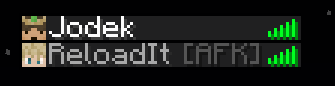
Shows in tab list

Features

1. Players are marked as AFK --> displayed next to the name

2. Setting to get an announcement when a player is AFK

3. Adjustable time until you are AFK

4. /trigger afk to instatly be AFK

5. Setting to choose if players get kicked when AFK or not

Config

/trigger afk_announcer.config

Config Pre 1.21.6

/trigger afkannouncer.config

/trigger afkannouncer.color.config

To uninstall run: /function afkannouncer:uninstall

<details> <summary>Pre 1.21 Config</summary>

## Config

To adjust the duration before being marked as AFK:

/trigger afk_timer set value

value = seconds until you are AFK

default = 5 minutes = 300 seconds

To disable the AFK Announcer for yourself, you can set the value to 0


To change if you get a notification when you or someone else is AFK:

/trigger afk_notification set value

value = 1 = notificcation --> default

value = 2 = no notification


To change if you should be invulnerable when AFK:

/scoreboard players set &afk_invulnerable afk_announcer.config value

value = 0 = not invulnerable when AFK --> default

value = 1 = invulnerable when AFK


For the following to work you need to set function-permission-level to 3

To enable that players will always get kicked when AFK:

/scoreboard players set &afk_kick afk_announcer.config value

value = 0 = player do not get kicked when afk -> default

value = 1 = all players get kicked when afk


To enable so players can choose if they want to be kicked or not:

/scoreboard players set &afk_kick_player_control afk_announcer.config value

value = 0 = players can\'t choose if the want to be kicked or not --> default

value = 1 = players can choose


Individual player setting to choose if you want to be kicked or not:

/trigger individual_afk_kick set value

value = 0 = the player will not get kicked --> default

value = 1 = the player will get kicked

Change any color (config)

Showcase

Jodek is AFK!

!Jodek [AFK] is no longer AFK!

Shows in tab list

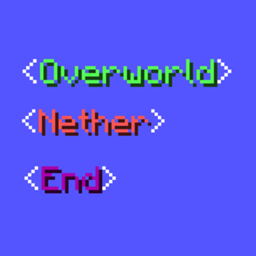
Compatible with my Show Dimension In Name datapack/mod

Chat with show dimension in name

Tab list with show dimension in name

afk-announcer-v4.2.2
MC 26.3
Release 2026-10-03 Get
afk-announcer-v4.2.0
MC 26.3
Release 2026-10-01 Get
afk-announcer-v4.2.1
MC 26.3
Release 2026-10-01 Get
AFK-Announcer v4.0.3
MC 1.21.8, 1.21.6, 1.21.7, 1.21.9, 1.21.10, 1.21.11, 26.1, 26.1.1, 26.1.2, 26.2
Release 2026-07-06 Get
afk-announcer v4.0.2.0
MC 1.21.8, 1.21.6, 1.21.7, 1.21.9, 1.21.10, 1.21.11, 26.1, 26.1.1, 26.1.2
Release 2026-04-10 Get
AFK-Announcer v4.0.2.1
MC 1.21.8, 1.21.6, 1.21.7, 1.21.9, 1.21.10, 1.21.11, 26.1, 26.1.1, 26.1.2
Release 2026-04-10 Get
AFK-Announcer v4.0.2.0
MC 1.21.8, 1.21.6, 1.21.7, 1.21.9, 1.21.10, 1.21.11, 26.1
Release 2026-03-29 Get
AFK-Announcer v4.0.2
MC 1.21.8, 1.21.6, 1.21.7, 1.21.9, 1.21.10, 1.21.11, 26.1
Release 2026-03-25 Get
AFK-Announcer v4.0.1
MC 1.21.8, 1.21.6, 1.21.7, 1.21.9, 1.21.10, 1.21.11
Release 2026-03-19 Get
AFK-Announcer v4.0.0
MC 1.21.8, 1.21.6, 1.21.7, 1.21.9, 1.21.10, 1.21.11
Release 2026-03-17 Get

Requirements & install

How to use this data pack in Minecraft
Mods needed
None, works in vanilla
Minecraft
1.21.9 – 26.3
Install folder
saves/<world>/datapacks

How to install data packs

  1. Download the data pack .zip file (do not extract it).
  2. New world: click Data Packs on the world creation screen and drop the .zip in. Existing world: open .minecraft/saves/<world>/datapacks.
  3. Put the .zip into the datapacks folder of the world (servers: world/datapacks).
  4. Run /reload in game (or rejoin the world) and check it with /datapack list.
Browse more: Data Packs for 26.3 All data packs

More from Jodek

Advertisement Remove ads with Premium →

You Might Also Like