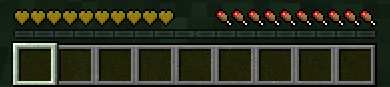
Whenever a player dies, they will be infected, but they can eat a golden apple to be cured. Death and curing will be announced in chat
Zombies won't burn in the day
Zombies always spawn with a decently high chance of spawning reinforcements
Sleeping won't pass the night anymore
Humans can't attack other humans, and the infected can't attack other infected.
There are 3 modes, which an operator can pick when the datapack is enabled.
If you need to change the mode (not recommended once someone becomes infected) or the menu was not visible on start, just run the command /function zombie_infection:menu to open the menu
Fast:
Meant to be for more of a manhunt style. Infected players can not be cured, keep inventory is on, and instant respawn is on.
Normal (Default):
A normal experience, not meant to be fast, but not too long. Infected players are slower, keep inventory on, and instant respawn is off.
Long:
Meant to be more of a roleplay scenario, make your own rules! Infected players are slower, have mining fatigue, and have less health. Keep inventory off, and instant respawn is also off.
This datapack is the most fun with other people but can be played solo as an extra challenge.
Thank you so much for reading this, or even downloading it! I hope you enjoy it!