Mineuniverse
Resource Packs
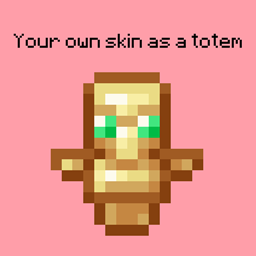
Your totem is your skin

Your totem is your skin

RESOURCE PACK
Your totem is now your skin
by SomroTeamDev
Download Claim this project
Add a badge to your pageLink to Your totem is your skin from a README, website or forum post.
Preview: Badge

Badges update automatically and link to the resource pack page on MineUniverse.

8,537 downloads
0 likes
0 followers
Updated Oct 14, 2026
0 hypes
Follow0
16x
Advertisement Remove ads with Premium →

What the goal of this pack?

I think have your skin as a totem is pretty, then I created this pack.

You can found a tutorial in the pack (its name is tutoral.txt)


How I can set the pack in my Resource packs?

Go in your .minecraft, resourcepacks, and drag and drop the pack.

I can't modify the pack

Just unzip the pack with right click, and select "Extract All..."

How to setup the pack?

TUTORIAL

1. Grab your own skin
go on https://namemc.com
search your pseudo
click on your profile
under your skin preview, there is all your skins and click on your latest
click on the download button

2. Put the skin in the Resource Pack
Go in your downloads, click on your skin and press Ctrl + X
Go in the resource pack : assets, minecraft, textures, item and press Ctrl + V
Rename your skin "totem" (verify the extension : it's normally png)

There it is!


If your have question, ask in the comments!

Here's my discord for suggest ideas or report an issue : https://discord.gg/7yXRx6yVVy

Your totem is your skin
MC 1.16.3, 1.16-Snapshot, 1.17.1, 1.21.2-Snapshot, 1.21, 1.21.6-snapshot, 1.16.1, 1.18.1, 1.20.2-Snapshot, 1.20.5-Snapshot, 1.15, 1.16, 1.19-Snapshot, 1.21.1-Snapshot, 1.16.5, 1.19.3
Release 2024-10-18 Get

Requirements & install

How to use this resource pack in Minecraft
Resolution
16x
Minecraft
1.19-Snapshot – 1.21.6-snapshot
Install folder
.minecraft/resourcepacks

How to install resource packs

  1. Download the resource pack .zip file (do not extract it).
  2. In Minecraft open Options → Resource Packs → Open Pack Folder.
  3. Drop the .zip into the resourcepacks folder (.minecraft/resourcepacks).
  4. Move the pack to the Selected column and click Done.
Browse more: 16x resource packs 32x resource packs 64x resource packs 128x resource packs 256x resource packs 512x+ resource packs Resource Packs for 1.21.6-snapshot All resource packs

More from SomroTeamDev

Advertisement Remove ads with Premium →

You Might Also Like