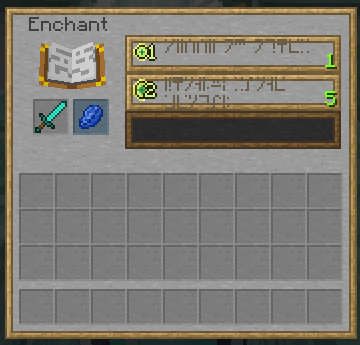
Wood and Stone GUI is a simple resource pack which gives the default GUIs an overhaul. Every GUI has a smooth stone with a wooden border. Buttons are Wood-framed Stone or solid wood planks. Check the Image tab to see pictures. Thanks to _iGalaxy for making the Cartography Table and New Villager GUIs!
Features
- All GUIs have been overhauled, including (but not limited to) Inventories, Brewing Stands, Shulker Boxes and Furnaces
- Shulker Boxes have GUIs based off their colours [Optifine Required]
- Advancement Menu has been overhauled also [Note, not 100% finished, need to do side tabs]
Supported Mods
- Just Enough Items [Link]
Changelogs
Version 1.8.1
- Same as Version 1.8, updated pack format to support 1.16.2+
Version 1.8
- Updated pack format to support 1.15+
- Added textures for GUI added in 1.16
- Added textures for Fabric ModMenu
Version 1.7
- Added textures for the 1.14 Block GUIs.
Version 1.6
- Actually fixed Coloured Shulker GUIs this time (Hopefully)
Version 1.5
- Fixed a bug with the Resource Pack Selection Menu
- Properly added Coloured Shulker GUIs
Version 1.4
- Added textures for Toasts.
- Fixed a bug with the Server Selection and Resource Pack Selection arrows.
Version 1.3
- Added a version for 1.12.
- Added Just Enough Items support. [Link]
Version 1.2
- Added Texture for the Loom GUI. [Only in 1.14 Snapshots]
- Added a lang file which prevents text overlap.
- Removed the icons.png file which was accidentally added from my personal resource pack.
Version 1.1
- Fixed a bug in the pack.mcmeta.
Version 1.0
- Retextured the entire Vanilla GUI.
- Released the Pack.
Known Bugs
- When Forge is installed, the longer buttons in the Mod Settings have a visual glitch in them, where some sections of the border are cut off, along with a wooden slat being down the middle. This is currently unfixable due to the way Forge generates these buttons. Hopefully this isn't too horrible. See the Spoiler for an example.

Check out my other projects!
[Anime Phantoms] - A soundpack that changes the sounds of Phantoms to various anime girls. Not a serious pack.
[Natural Nylium] - Adds Natural Variation to Crimson and Warped Nylium.
[Wood Ingots] - A Resource Pack that changes Charcoal to Wood Ingots. Not a serious pack.


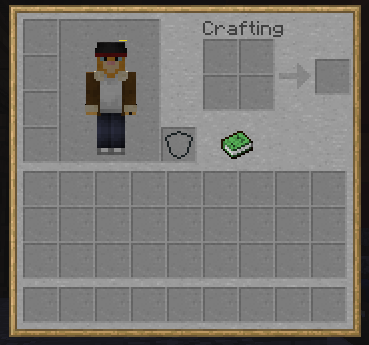
![Survival Hotbar [Does not include XP Bar]](https://media.forgecdn.net/attachments/241/86/unknown-5.png)
![Loom [Only in 1.14 Snapshots]](https://media.forgecdn.net/attachments/239/633/screen-shot-2018-10-24-at-10.png)
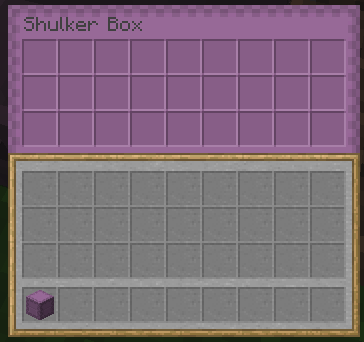
![Brewing Stand [Does not include Potion]](https://media.forgecdn.net/attachments/239/103/screen-shot-2018-10-16-at-3.png)
![Creative Inventory [Does not include Axe/Bottle]](https://media.forgecdn.net/attachments/239/102/screen-shot-2018-10-16-at-3.png)