Mineuniverse
Resource Packs
Wendigo PVP [smp/pvp]

Wendigo PVP [smp/pvp]

RESOURCE PACK
All in one Texture Pack meant for SMP's and PVP
by rehemm
Download Claim this project
Add a badge to your pageLink to Wendigo PVP [smp/pvp] from a README, website or forum post.
Preview: Badge

Badges update automatically and link to the resource pack page on MineUniverse.

7,041 downloads
0 likes
0 followers
Updated Oct 14, 2026
0 hypes
Follow0
16x Data Packs Miscellaneous Mod Support
Advertisement Remove ads with Premium →

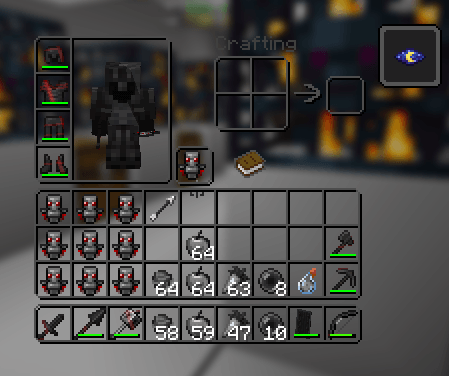
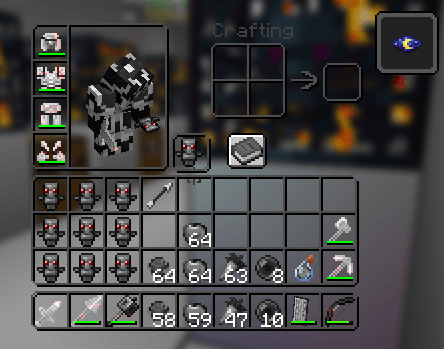
heres everything in my pack

  • Outlined ores
  • Low Res dirt
  • Purple Diamond 
  • All wool is a single color
  • Custom crosshair
  • Full visibility with pumpkins on head
    -   Better glass texture
    -   Hidden bedrock (good for streamers)
    -   Low fire
    -   Blue ancient debris
    -   White enderman (idk it seemed cool)


    SOUNDS REVAMPED


Wendi WHITE V.3.zip
MC 1.21.11, 26.1, 26.1.1, 26.1.2, 26.2
Release 2026-08-26 Get
Wendi BLACK V.2.zip
MC 1.21.11, 26.1, 26.1.1, 26.1.2, 26.2
Release 2026-08-25 Get
Wendi BLACK V.1.zip
MC 1.21.11, 26.1, 26.1.1, 26.1.2, 26.2
Release 2026-08-24 Get
Wendi WHITE V.1.zip
MC 1.21.11, 26.1, 26.1.1, 26.1.2, 26.2
Release 2026-08-24 Get
Wendi WHITE V.2.zip
MC 1.21.11, 26.1, 26.1.1, 26.1.2, 26.2
Release 2026-08-24 Get
Swats Texture Pack V.26.zip
MC 1.21.11, 26.1, 26.1.1, 26.1.2, 26.2
Release 2026-08-22 Get
Swats Texture Pack V.25.zip
MC 1.21.11, 26.1, 26.1.1, 26.1.2, 26.2
Release 2026-08-20 Get
Swats Texture Pack V.23 (1.21.11+).zip
MC 1.21.11, 26.1, 26.1.1, 26.1.2, 26.2
Release 2026-08-18 Get
Swats Texture Pack V.22 (1.21.11+).zip
MC 1.21.11, 26.1, 26.1.1, 26.1.2, 26.2
Release 2026-08-17 Get
Swat's texture pack !! V.19.zip
MC 1.21.11
Release 2026-08-15 Get

Requirements & install

How to use this resource pack in Minecraft
Resolution
16x
Minecraft
1.21.11 – 26.2
Install folder
.minecraft/resourcepacks

How to install resource packs

  1. Download the resource pack .zip file (do not extract it).
  2. In Minecraft open Options → Resource Packs → Open Pack Folder.
  3. Drop the .zip into the resourcepacks folder (.minecraft/resourcepacks).
  4. Move the pack to the Selected column and click Done.
Browse more: 16x resource packs 32x resource packs 64x resource packs 128x resource packs 256x resource packs 512x+ resource packs Resource Packs for 26.2 All resource packs
Advertisement Remove ads with Premium →

You Might Also Like