Mineuniverse
Resource Packs
visible powder snow plus

visible powder snow plus

RESOURCE PACK
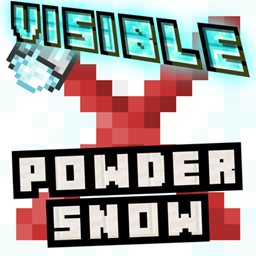
Highlights hidden Powder Snow with a bold visual "X".
by MysticNich
Download Claim this project
14 downloads
0 likes
0 followers
Updated Oct 14, 2026
0 hypes
Follow0
16x Miscellaneous
Advertisement Remove ads with Premium →
Visible Powder Snow (Resoucepack)

Ever explored a snowy biome or climbed a mountain, only to suddenly sink into a block of Powder Snow and slowly freeze to death? Yeah, we've all been there, and it’s incredibly annoying.
Visible Powder Snow fixes this with a simple, clean visual tweak.


How it works:
If you download the Extra Item Version, it also changes the item texture! The Powder Snow Bucket will feature the same custom "X" icon in your inventory, making it super easy to tell apart from a regular milk bucket at a single glance.


Extra Item Version:
This resourcepack adds a highly visible "X" overlay onto all Powder Snow blocks. They no longer look exactly like regular snow, allowing you to spot the danger from a distance. You can easily navigate snowy peaks, build your winter base, or explore without falling into accidental death traps.


How to Install:
  1. Download the .zip file (choose between the Standard or Extra Item version).
  2. Open Minecraft, go to Options... -> Resource Packs... -> Open Pack Folder
  3. Drag and drop the downloaded .zip file into that folder.
  4. Select the pack in the menu, move it to the right side, and click Done!

visible_powder_snow_extra.zip
MC 1.17.1, 1.21, 1.18.1, 1.19.3, 1.20.2, 1.19.4, 1.21.8, 1.17, 1.20.5, 1.21.5, 1.18, 1.21.4, 1.20.1, 1.20, 1.20.6, 1.21.1, 1.21.6, 1.21.3, 1.21.7, 1.19.1, 1.20.4, 1.18.2, 1.19.2
Release 2026-10-07 Get
visible_powder_snow
MC 1.17.1, 1.21, 1.18.1, 1.19.3, 1.20.2, 1.19.4, 1.21.8, 1.17, 1.20.5, 1.21.5, 1.18, 1.21.4, 1.20.1, 1.20, 1.20.6, 1.21.1, 1.21.6, 1.21.3, 1.21.7, 1.19.1, 1.20.4, 1.18.2, 1.19.2
Release 2026-10-07 Get

Requirements & install

How to use this resource pack in Minecraft
Resolution
16x
Minecraft
1.21 – 1.21.8
Install folder
.minecraft/resourcepacks

How to install resource packs

  1. Download the resource pack .zip file (do not extract it).
  2. In Minecraft open Options → Resource Packs → Open Pack Folder.
  3. Drop the .zip into the resourcepacks folder (.minecraft/resourcepacks).
  4. Move the pack to the Selected column and click Done.
Browse more: 16x resource packs 32x resource packs 64x resource packs 128x resource packs 256x resource packs 512x+ resource packs Resource Packs for 1.21.8 All resource packs

More from MysticNich

Advertisement Remove ads with Premium →

You Might Also Like