Mineuniverse
Resource Packs
Villager Armor Stands (VAS)

Villager Armor Stands (VAS)

RESOURCE PACK
Custom skins for Armor Stands to look like villagers doing different tasks like workout, sleeping, etc
by DiegoAvz
Download Claim this project
Add a badge to your pageLink to Villager Armor Stands (VAS) from a README, website or forum post.
Preview: Badge

Badges update automatically and link to the resource pack page on MineUniverse.

8,650 downloads
0 likes
0 followers
Updated Oct 14, 2026
0 hypes
Follow0
32x Animated Data Packs Miscellaneous Mod Support
Advertisement Remove ads with Premium →

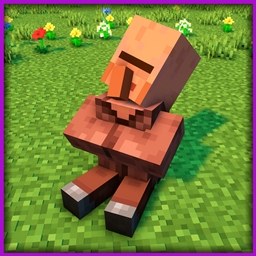
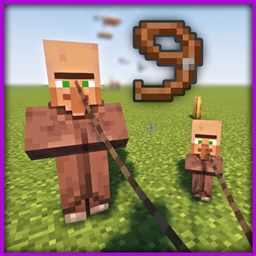
In this project, I have changed the texture of the Armor Stands to look like villagers doing different tasks like sleeping, training, laying down or even being dead. 

The models are animated to make them realistic. Some villagers have a breathing animation (such as the sleeping villager or the bowing villager), or villagers doing a workout do the full movement (such as push-ups or sit-ups). Dead villagers have no animation for obvious reasons. 

YOU CAN USE OPTIFINE OR, IF YOU ARE PLAYING WITH SODIUM, YOU CAN JUST INSTALL "CEM" MOD INSTEAD


To see each villager, you have to tag the armor stand with the following tags:

- Tag "Villager": Randomly put one of the following villager skins. 

- Tag "Villager1": Dead villager 1

- Tag "Villager2": Dead villager 2

- Tag "Villager3": Dead villager 3

- Tag "Villager4": (Animated) Villager sitting sleeping. 

- Tag "Villager5": (Animated) Villager doing push ups, exercise.

- Tag "Villager6": (Animated) Head down sad villager.

- Tag "Villager7": (Animated) Villager doing crunches, exercise.

I have tried this texture packs with the most famous shaders and I have not found any problem. If you have any review or suggestion you can leave it in the comments. Thank you.


The use of this texture pack for personal use is only allowed, sharing it with third parties or using it for advertising or profit-making purposes is prohibited. All rights reserved. 

Any questions or proposals, you can send an email to [email protected]. 

VillagerArmorStands_v1.0_mc1.21-1.21.4.zip
MC 1.21, 1.21.4, 1.21.3, 1.21.1, 1.21.2
Release 2025-01-24 Get
VillagerArmorStands_v1.0_mc1.20-1.20.1
MC 1.20.1, 1.20
Release 2023-07-07 Get

Requirements & install

How to use this resource pack in Minecraft
Resolution
32x
Minecraft
1.20 – 1.21.4
Install folder
.minecraft/resourcepacks

How to install resource packs

  1. Download the resource pack .zip file (do not extract it).
  2. In Minecraft open Options → Resource Packs → Open Pack Folder.
  3. Drop the .zip into the resourcepacks folder (.minecraft/resourcepacks).
  4. Move the pack to the Selected column and click Done.
Browse more: 16x resource packs 32x resource packs 64x resource packs 128x resource packs 256x resource packs 512x+ resource packs Resource Packs for 1.21.4 All resource packs

More from DiegoAvz

Advertisement Remove ads with Premium →

You Might Also Like