Mineuniverse
Resource Packs
Venusia pack [16x][1.2.5]

Venusia pack [16x][1.2.5]

RESOURCE PACK
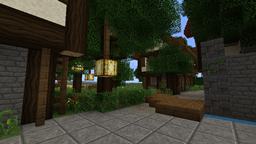
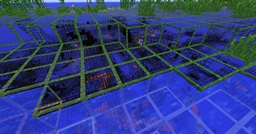
I want to present to you my texture pack that contains bright and colorful palette, that makes you feel happy I believe!
by _ForgeUser6174261
Download Claim this project
Add a badge to your pageLink to Venusia pack [16x][1.2.5] from a README, website or forum post.
Preview: Badge

Badges update automatically and link to the resource pack page on MineUniverse.

25,668 downloads
0 likes
0 followers
Updated Oct 14, 2026
0 hypes
Follow0
Miscellaneous
Advertisement Remove ads with Premium →

http://i.imgur.com/MPIsL.png
I want to present to you my texture pack that contains bright and colorful palette, that makes you feel happy I believe!

Some screenshots?
http://i.imgur.com/vXfDtl.jpg
http://i.imgur.com/27eMCl.png
http://i.imgur.com/6y7iZl.png
http://i.imgur.com/eXV6Vl.jpg
http://i.imgur.com/iMsoSl.png

This is my thrid pack, i used 100% pixel-art style and contrast bright palette. So this is result. This pack isnt done fully for this moment, but u can use it . Im really dont know what to tell more. And sorry for my english :)

Venusia_pack__pre1_.zip
MC CB 1.2.5-R3.0
Beta 2012-06-07 Get

Requirements & install

How to use this resource pack in Minecraft
Resolution
Not specified
Minecraft
See the Files tab
Install folder
.minecraft/resourcepacks

How to install resource packs

  1. Download the resource pack .zip file (do not extract it).
  2. In Minecraft open Options → Resource Packs → Open Pack Folder.
  3. Drop the .zip into the resourcepacks folder (.minecraft/resourcepacks).
  4. Move the pack to the Selected column and click Done.
Browse more: 16x resource packs 32x resource packs 64x resource packs 128x resource packs 256x resource packs 512x+ resource packs All resource packs
Advertisement Remove ads with Premium →

You Might Also Like