Mineuniverse
Resource Packs
Unown Alphabet

Unown Alphabet

RESOURCE PACK
It's like reading but worse!
by LyokoG
Download Claim this project
392 downloads
0 likes
0 followers
Updated Oct 14, 2026
0 hypes
Follow0
16x Font Packs
Advertisement Remove ads with Premium →

I've had to rewrite this three times so I'm giving up and being less fun about it.

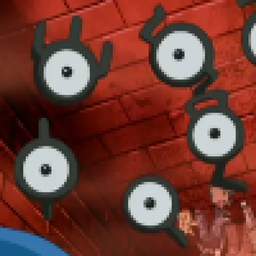
Have you played any of the Johto Pokemon games and have the useless knowledge of being able to read the Unown? Then this might be for you!


Featuring 3 styles of Unown:
Original - The intended way to use this barely readable font pack

Light Mode - Inverted the text colour for more consistency

"Outline" - Adds a bit of a white outline to the right of each letter


This currently doesn't support accented letter but that could change in the future

Keep in mind that this isn't a full refont and it's supposed to be a novelty, it's not intended to be actually played with. Unless you're crazy.

Unown Alphabet - Light Mode.zip
MC 1.17.1, 1.19-Snapshot, 1.16.5, 1.18.2, 1.12.2
Release 2022-05-18 Get
Unown Alphabet - Original.zip
MC 1.17.1, 1.9.4, 1.14.4, 1.19-Snapshot, 1.7.3, 1.16.5, 1.10.2, 1.18.2, 1.15.2, 1.5.2, 1.6.4, 1.11.2, 1.12.2, 1.8.9, 1.13.2
Release 2022-05-18 Get
Unown Alphabet - Outline.zip
MC 1.19-Snapshot, 1.16.5, 1.18.2, 1.12.2
Beta 2022-05-18 Get

Requirements & install

How to use this resource pack in Minecraft
Resolution
16x
Minecraft
1.12.2 – 1.19-Snapshot
Install folder
.minecraft/resourcepacks

How to install resource packs

  1. Download the resource pack .zip file (do not extract it).
  2. In Minecraft open Options → Resource Packs → Open Pack Folder.
  3. Drop the .zip into the resourcepacks folder (.minecraft/resourcepacks).
  4. Move the pack to the Selected column and click Done.
Browse more: 16x resource packs 32x resource packs 64x resource packs 128x resource packs 256x resource packs 512x+ resource packs Resource Packs for 1.19-Snapshot All resource packs

More from LyokoG

Advertisement Remove ads with Premium →

You Might Also Like