Mineuniverse
Resource Packs
Unique wools

Unique wools

RESOURCE PACK
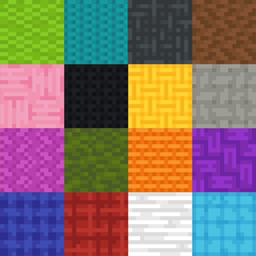
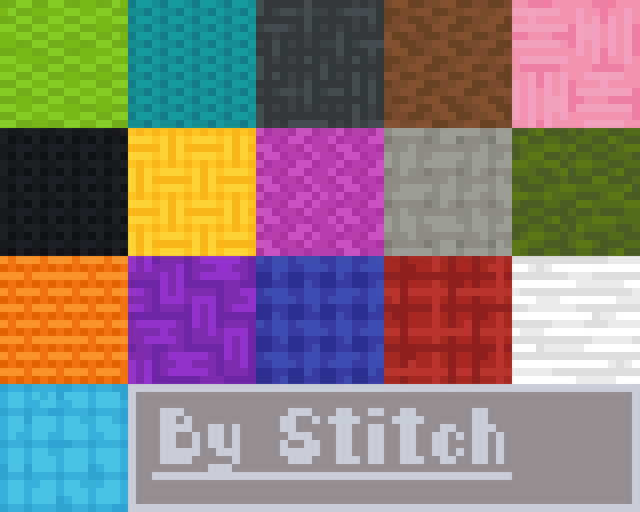
Unique Wools gives each Minecraft wool color a unique pattern, making blocks easier to identify for colorblind players while keeping the vanilla style simple, clear, and accessible.
by Midons
Download Claim this project
479 downloads
0 likes
Updated Oct 14, 2026
0 hypes
16x Miscellaneous Modern
Advertisement Remove ads with Premium →

🇺🇸 English (Description):

Unique Wools is a Minecraft resource pack designed to make wool blocks easier to distinguish for everyone — especially colorblind players. Instead of relying only on color, each wool now features a unique pattern or shape, giving every color its own visual identity. Whether you're building, organizing, or surviving, you’ll never confuse your blocks again. Simple, clean, and accessibility-focused, Unique Wools enhances your gameplay without changing the vanilla feel.

Texture made by STITCH


---


🇧🇷 Português (Descrição):

Unique Wools é um resource pack de Minecraft feito para tornar os blocos de lã mais fáceis de diferenciar — especialmente para jogadores daltônicos. Em vez de depender apenas das cores, cada lã possui um padrão ou formato único, dando a cada cor uma identidade visual própria. Seja construindo, organizando ou sobrevivendo, você nunca mais vai confundir seus blocos. Simples, limpo e focado em acessibilidade, Unique Wools melhora sua experiência sem perder o estilo vanilla.


TEXTURA FEITA POR: STITCH

Unique-Wools-1.0
MC 1.16.3, 1.13.1, 1.9.3, 1.8.7, 1.7.4, 1.7.7, 1.7.6, 1.17.1, 1.9.1, 1.21, 1.7.5, 1.6.1, 1.16.1, 1.18.1, 1.14.3, 1.15, 1.16, 1.13, 1.7.3, 1.7.2, 1.16.5, 1.10.2, 1.19.3, 1.20.2
Beta 2026-04-26 Get

Requirements & install

How to use this resource pack in Minecraft
Resolution
16x
Minecraft
1.16.1 – 1.21
Install folder
.minecraft/resourcepacks

How to install resource packs

  1. Download the resource pack .zip file (do not extract it).
  2. In Minecraft open Options → Resource Packs → Open Pack Folder.
  3. Drop the .zip into the resourcepacks folder (.minecraft/resourcepacks).
  4. Move the pack to the Selected column and click Done.
Browse more: 16x resource packs 32x resource packs 64x resource packs 128x resource packs 256x resource packs 512x+ resource packs Resource Packs for 1.21 All resource packs

More from Midons

Advertisement Remove ads with Premium →

You Might Also Like