Badges update automatically and link to the resource pack page on MineUniverse.
This texture pack requires Optifine, download at optifine.net/downloads. This pack created and tested using version 1.12.2 HD U F5.
This texture pack is for Sky Factory 4, giving distinct textures to saplings, acorns, resin and amber, instead of just tinting the same texture a different colour. It uses the Custom Item Textures feature of Optifine to texture the items and the Connected Textures feature to texture the blocks in world.
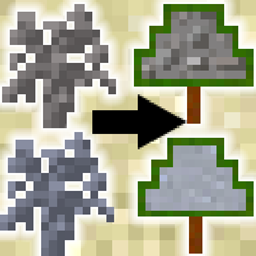
Before:

After:

Gravel, Sand, Clay, Petrified, and Cottonwood saplings. Much better, right?
Cottonwood produces string which makes wool, I felt a wool texture was better than awkwardly shoving in a string texture to a tree shape and leaving a lot of empty space lol.
Issues:
The custom item textures only show up in an inventory. They do not work in JEI, the items will still use a recoloured version of the same texture, I have provided ore textures. This will make it look similar to ores (iron, diamond) but not others (bone, clay, gravel). Try going into creative or JEI cheat mode to give yourself all the items and see all the custom textures (or if you're hardcore which isn't me, use survival to get them all). If you know how to fix this please tell me :)
The roasted acorns have white crumb eating particles regardless of the acorn you are eating.
The textures have a slight tint, this is hard coded in the java of the underlying mod unfortunately :/
If it doesn't work or a texture looks off, then please let me know as this is my first texture pack :)