Mineuniverse
Resource Packs
Unique Dark - Mekanism Support

Unique Dark - Mekanism Support

RESOURCE PACK
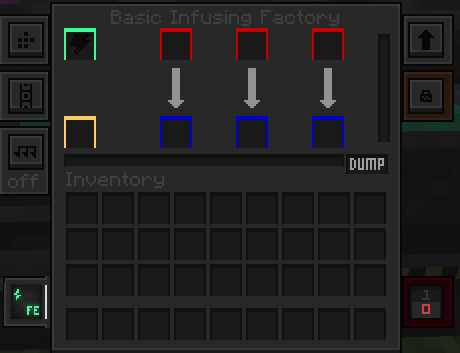
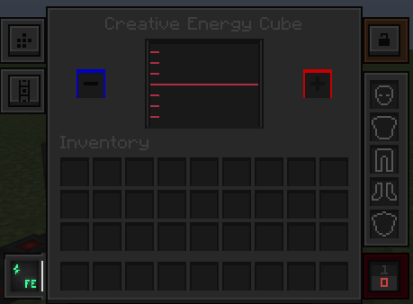
Support for mekanism in Unique Dark
by Scorpidz
Download Claim this project
172,593 downloads
0 likes
0 followers
Updated Oct 14, 2026
0 hypes
Follow0
16x Mod Support
Advertisement Remove ads with Premium →

This texture pack is an addon for Unique Dark by amongstreality make sure to check it out!

The texture pack is only available on Modrinth And Curseforge. Do not download from any other sites!

Supported Mods:

Terms of use

Author: CrimsonFlames

When you can use my asset:

  • In modpacks on curseforge, modrinth
  • Any private modifications of the original resource pack.

When you cannot use:

  • Distribution on the Bedrock Marketplace
  • Locking behind a paywall
  • Distribution of original/modified assets on any platforms.

Links:

Modrinth

Curseforge

Unique Dark - Mekanism 1.20.2-1.21.1 v2.1
MC 1.21, 1.21.1-Snapshot, 1.20.2, 1.20.1, 1.21.1, 1.20.4, 1.21-Snapshot
Release 2026-04-10 Get
Unique Dark - Mekanism 1.20.2-1.21.x v2.0
MC 1.21.2-Snapshot, 1.21, 1.21.6-snapshot, 1.20.2-Snapshot, 1.20.5-Snapshot, 1.21.1-Snapshot, 1.20.2, 1.21.8, 1.20.5, 1.21.5, 1.21.4, 1.21.5-Snapshot, 1.20.1, 1.20.6, 1.21.1, 1.21.6
Release 2025-12-06 Get
Unique Dark - Mekanism 1.20.2-1.21 v1.1.x.zip
MC 1.20.2, 1.21.2-Snapshot, 1.21, 1.21.6-snapshot, 1.20.5, 1.21.5, 1.20.2-Snapshot, 1.20.5-Snapshot, 1.21.8, 1.21.1-Snapshot, 1.21.9, 1.21.4, 1.21.5-Snapshot, 1.20.3-Snapshot, 1.20.3
Release 2025-10-07 Get
Unique Dark - Mekanism 1.20.2-1.21.x.zip
MC 1.20.2, 1.21.2-Snapshot, 1.21, 1.21.6-snapshot, 1.20.5, 1.21.5, 1.20.2-Snapshot, 1.20.5-Snapshot, 1.21.8, 1.21.1-Snapshot, 1.21.9, 1.21.4, 1.21.5-Snapshot, 1.20.3-Snapshot, 1.20.3
Release 2025-10-03 Get

Requirements & install

How to use this resource pack in Minecraft
Resolution
16x
Minecraft
1.21.2-Snapshot – 1.21.9
Install folder
.minecraft/resourcepacks

How to install resource packs

  1. Download the resource pack .zip file (do not extract it).
  2. In Minecraft open Options → Resource Packs → Open Pack Folder.
  3. Drop the .zip into the resourcepacks folder (.minecraft/resourcepacks).
  4. Move the pack to the Selected column and click Done.
Browse more: 16x resource packs 32x resource packs 64x resource packs 128x resource packs 256x resource packs 512x+ resource packs Resource Packs for 1.21.9 All resource packs

More from Scorpidz

Advertisement Remove ads with Premium →

You Might Also Like