Mineuniverse
Resource Packs
Uncapitalized advancement descriptions

Uncapitalized advancement descriptions

RESOURCE PACK
uncapitalizes common nouns in advancement descriptions
by VinnyG0621
Download Claim this project
Add a badge to your pageLink to Uncapitalized advancement descriptions from a README, website or forum post.
Preview: Badge

Badges update automatically and link to the resource pack page on MineUniverse.

270 downloads
0 likes
0 followers
Updated Oct 14, 2026
0 hypes
Follow0
Font Packs Miscellaneous Mod Support Photo Realistic Traditional
Advertisement Remove ads with Premium →

🙅 are you an improper capitalization hater? cuz I sure am. 🛑


have you ever gotten annoyed/frustrated that most common nouns in the advancement descriptions are capitalized? well, this pack is just for you!

and if you're like me, you're gonna be so happy I made this so you don't have to!


also has some mod compat! suggest a mod that has advancements you don't like to be capitalized. it has to be a mod that has an advancement description that has a common noun capitalized in it which shouldn't be capped, or else it will likely not be considered/planned!


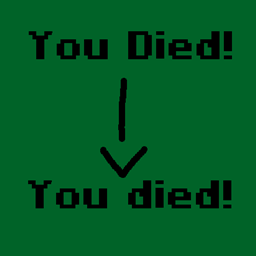
example of what the pack changes:

Some examples:

❌ = the improper vanilla description, ✔️ = the newly corrected capitalization in the description fixed by the texture pack.

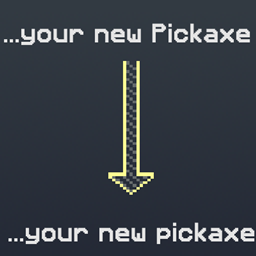
  Stone

❌: Mine Stone with your new Pickaxe

✔️: Mine stone with your new pickaxe


  Fish

❌: Catch a Fish... without a Fishing Rod!

✔️: Catch a fish... without a fishing rod!


  Crossbow

❌: Shoot a Crossbow

✔️: Shoot a crossbow


more examples are coming soon~!


Uncapitalized advancements b1.0 - MC 1.20
MC 1.20.1, 1.20
Beta 2024-08-16 Get

Requirements & install

How to use this resource pack in Minecraft
Resolution
Not specified
Minecraft
1.20 – 1.20.1
Install folder
.minecraft/resourcepacks

How to install resource packs

  1. Download the resource pack .zip file (do not extract it).
  2. In Minecraft open Options → Resource Packs → Open Pack Folder.
  3. Drop the .zip into the resourcepacks folder (.minecraft/resourcepacks).
  4. Move the pack to the Selected column and click Done.
Browse more: 16x resource packs 32x resource packs 64x resource packs 128x resource packs 256x resource packs 512x+ resource packs Resource Packs for 1.20.1 All resource packs

More from VinnyG0621

Advertisement Remove ads with Premium →

You Might Also Like