Mineuniverse
Resource Packs
ukia's spears and lances

ukia's spears and lances

RESOURCE PACK
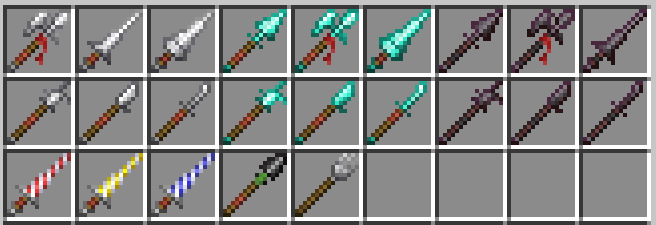
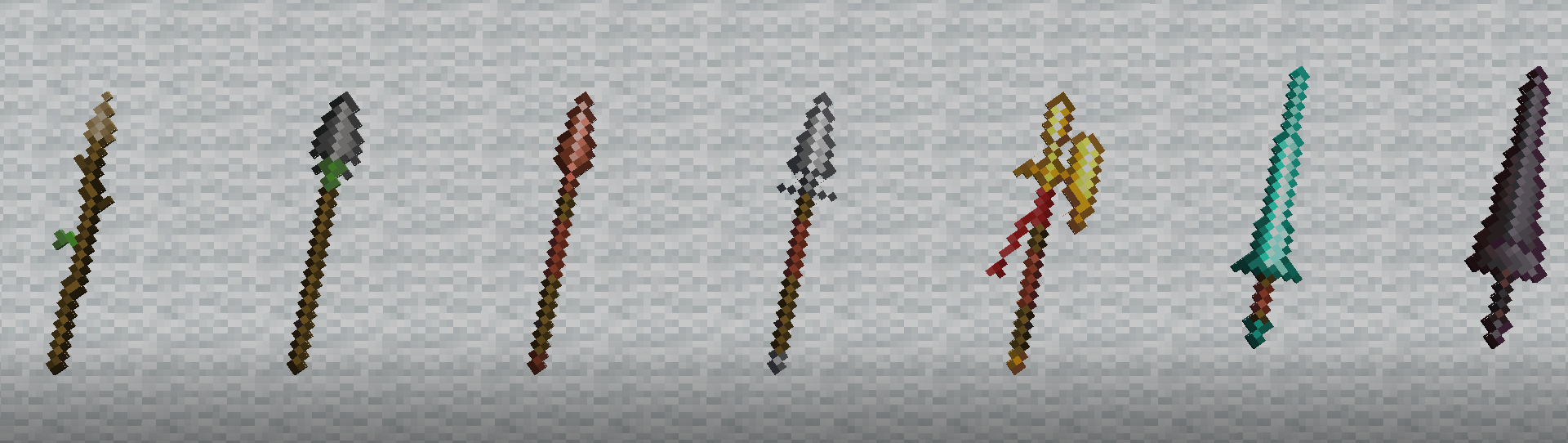
adds visual weight progression from light spears to heavy lances. (WITH RENAMES) all materials able to be renamed into the shapes of the others. tournament lances based on houses from Fire Emblem: Three Houses. No mods required.
by ukia
Download Claim this project
Add a badge to your pageLink to ukia's spears and lances from a README, website or forum post.
Preview: Badge

Badges update automatically and link to the resource pack page on MineUniverse.

1,453 downloads
0 likes
0 followers
Updated Oct 14, 2026
0 hypes
Follow0
16x Miscellaneous
Advertisement Remove ads with Premium →

adds visual weight progression from light spears to heavy lances. (WITH RENAMES) all materials able to be renamed into the shapes of the others. tournament lances based on houses from Fire Emblem: Three Houses.

No mods required.

Renames List: (Current)

  • "Adler Lance" = Red Tournament Lance. (for Iron, Diamond, and Netherite)
  • "Hirsch Lance" = Yellow Tournament Lance. (for Iron, Diamond, and Netherite)
  • "Lowen Lance" = Blue Tournament Lance. (for Iron, Diamond, and Netherite)
  • "Flint Spear" = Flint Headed Spear. (for Stone Spear)
  • "Pitchfork" = Pitchfork. (for Wooden Spear)
  • "(Material) Lance" = Spear in Lance Shape. (for Iron, and Netherite)
  • "(Material) Halberd" = Spear in Lance Shape. (for Iron, Diamond, and Netherite)
  • "(Material) Boar Spear" = Shape of Iron Spear. (for Diamond and Netherite)
  • "(Material) Greatlance" = Spear in Greatlance Shape. (for Iron and Diamond)
  • "(Material) Guisarme" = French Guisarme Polearm Shape. (for Iron, Diamond, and Netherite)
  • "(Material) Glaive" = Glaive Shape. (for Iron, Diamond, and Netherite)
  • "(Material) Naginata" = Naginata Shape. (for Iron, Diamond, and Netherite)
1.1
MC 1.21.11
Release 2025-12-24 Get

Requirements & install

How to use this resource pack in Minecraft
Resolution
16x
Minecraft
1.21.11
Install folder
.minecraft/resourcepacks

How to install resource packs

  1. Download the resource pack .zip file (do not extract it).
  2. In Minecraft open Options → Resource Packs → Open Pack Folder.
  3. Drop the .zip into the resourcepacks folder (.minecraft/resourcepacks).
  4. Move the pack to the Selected column and click Done.
Browse more: 16x resource packs 32x resource packs 64x resource packs 128x resource packs 256x resource packs 512x+ resource packs Resource Packs for 1.21.11 All resource packs
Advertisement Remove ads with Premium →

You Might Also Like