Close menu
Mods
Browse
Plugins
Bukkit, Spigot & Paper plugins
Maps
Adventure, parkour & survival maps
Resource Packs
Textures from 16x to 512x+
Data Packs
Vanilla-friendly game changes
Shaders
Iris & OptiFine shader packs
Mod Packs
Curated mod collections
Minecraft Versions
Everything for one version
Mod Compatibility
Find mods that work together
Search everything
Mods, packs, shaders & more
Browse
Plugins
Bukkit, Spigot & Paper plugins
Maps
Adventure, parkour & survival maps
Resource Packs
Textures from 16x to 512x+
Data Packs
Vanilla-friendly game changes
Shaders
Iris & OptiFine shader packs
Mod Packs
Curated mod collections
Minecraft Versions
Everything for one version
Mod Compatibility
Find mods that work together
Search everything
Mods, packs, shaders & more
Servers
Players
Wiki
Tools
Games
More
News
How to Craft
Mob Drops
Villager Trades
Biome Spawns
Minecraft Skins
Server of the Month
App
More
News
How to Craft
Mob Drops
Villager Trades
Biome Spawns
Minecraft Skins
Server of the Month
App
Log in
Register
Log in
Register
Resource Packs
UI update (dark)
RESOURCE PACK
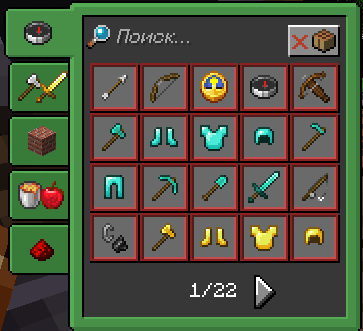
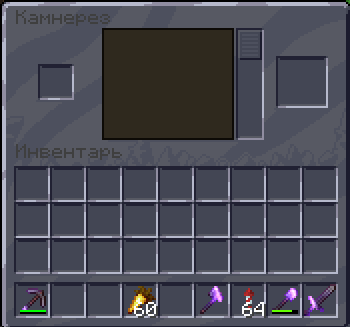
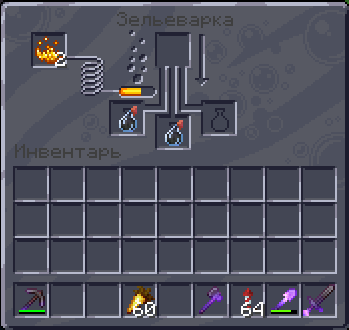
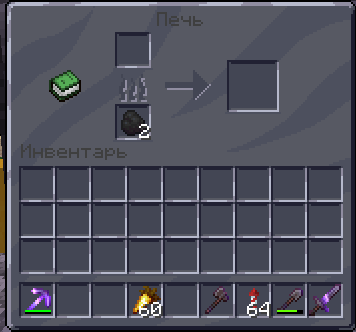
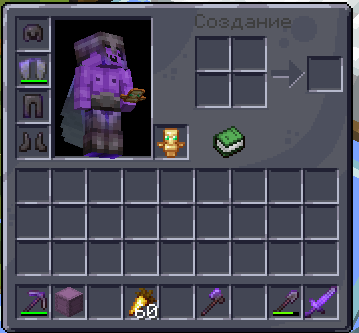
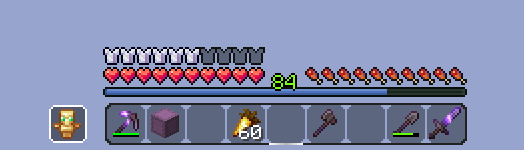
Texturepack will update your Interface (dark)
by
xiader45
Download
Report
Claim this project
1,812 downloads
0 likes
Updated Oct 14, 2026
0 hypes
16x
Miscellaneous
Photo Realistic
Share
Copy link
Copy for Discord
Reddit
X
Home
/
Resource Packs
/
16x
/
UI update (dark)
Advertisement
Remove ads with Premium →
Description
Files (1)
Screenshots (6)
Texturepack will update your Interface (dark)
UI Update.zip
MC 1.16-Snapshot, 1.17.1, 1.9.1, 1.16.3, 1.13.1, 1.9.3, 1.8.7, 1.15-Snapshot, 1.16.1, 1.18.1, 1.10-Snapshot, 1.9.4, 1.9.2, 1.8.4, 1.14.4, 1.14.1, 1.12.1, 1.17, 1.12, 1.14.3, 1.15
Release
2022-09-24
Get
Requirements & install
How to use this resource pack in Minecraft
Resolution
16x
Minecraft
1.15-Snapshot – 1.18.1
Install folder
.minecraft/resourcepacks
How to install resource packs
1
Download the resource pack .zip file (do not extract it).
2
In Minecraft open Options → Resource Packs → Open Pack Folder.
3
Drop the .zip into the resourcepacks folder (.minecraft/resourcepacks).
4
Move the pack to the Selected column and click Done.
Browse more:
16x resource packs
32x resource packs
64x resource packs
128x resource packs
256x resource packs
512x+ resource packs
Resource Packs for 1.18.1
All resource packs
Advertisement
Remove ads with Premium →
More from xiader45
Totem of Golden Relic
943
Modern Toasts
702
Clear Game Title
639
Dark Totem
591
Boneraiser Minions Totem of Undying
416
Green Slot Highlight
2,620
Advertisement
Remove ads with Premium →
You Might Also Like
Suren's FTB Quests
Renewed some visual aspects of popular quest mod!
999,925
Waving in the Wind
Makes the world feel more alive by making things wave.
9,979
Tax' Dragon Elytra
Dragon Elytra is a Minecraft resourcepack aims to change the Elytra item and model textures.
9,978
Vault Ore Borders Pack! - Vault Hunters
This adds Borders to Vault Ores
9,973
Updated Bats
Updates bats on older versions
9,972
Russian Localization
Russian Localization for Minecraft
9,957
Report Mod
Reason
Malicious content
Copyright violation
Broken download
Spam
Other
Your email (optional)
Details
Cancel
Submit Report