Mineuniverse
Resource Packs
Twilight Forest: JAPPA Pack (official addon)

Twilight Forest: JAPPA Pack (official addon)

RESOURCE PACK
A more current look for Twilight Forest!
by Killer_Demon
Download Claim this project
1,238,693 downloads
0 likes
0 followers
Updated Oct 14, 2026
0 hypes
Follow0
16x Mod Support Traditional
Advertisement Remove ads with Premium →

BROUGHT TO YOU BY: Vivi  &  Sully 


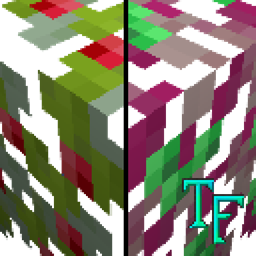
A MODERN TWILIGHT FOREST RESOURCE PACK

Twilight Forest prides itself on being oldschool, but why limit yourself to a single palette? With this resource pack, you can bring Twilight Forest into the modern era of vanilla Minecraft. Simply download and install it like any old resource pack and you're good to go to enjoy the consistency you're looking for!


FREQUENTLY ASKED QUESTIONS

Can I use this in my modpack?

Of course! Use it in any of your CurseForge modpacks that you'd like!

Who made the textures and models?

All the hard work was done by our very own Vivi and Sully! They volunteered to create JAPPA-style updated textures for the mod, and were good enough to deliver!

Wait a minute, wasn't this part of the main mod?

It was. We split it to not have to maintain our in-game resource pack switching any more. This also makes it easier for the artists who worked on this to push updates to the textures without waiting on a new version of the mod.

Does this still have the new mob models?

Indeed it does. This resource pack supports the new mob models that were introduced along with these textures.

Why not remove the old textures instead of the new ones?

Twilight Forest is one of the oldest mods still going to this day. We care immensely about our legacy and the nostalgia people feel for it, so removing the old textures isn't something we'd want to do.

 

Twilight JAPPA Pack - 1.21.1 - 1.2.0
MC 1.21.1
Release 2025-04-28 Get
Twilight JAPPA Pack - 1.20.3 - 1.1.0
MC 1.20.3-Snapshot, 1.20.3, 1.20.4
Release 2023-12-08 Get
Twilight JAPPA Pack 1.0.0
MC 1.19.3, 1.20.2, 1.19.4-Snapshot, 1.20.2-Snapshot, 1.19.4, 1.19-Snapshot, 1.19.2, 1.20.1, 1.20, 1.19.1, 1.20-Snapshot, 1.19, 1.19.3-Snapshot
Release 2023-07-08 Get

Requirements & install

How to use this resource pack in Minecraft
Resolution
16x
Minecraft
1.20 – 1.21.1
Install folder
.minecraft/resourcepacks

How to install resource packs

  1. Download the resource pack .zip file (do not extract it).
  2. In Minecraft open Options → Resource Packs → Open Pack Folder.
  3. Drop the .zip into the resourcepacks folder (.minecraft/resourcepacks).
  4. Move the pack to the Selected column and click Done.
Browse more: 16x resource packs 32x resource packs 64x resource packs 128x resource packs 256x resource packs 512x+ resource packs Resource Packs for 1.21.1 All resource packs

More from Killer_Demon

Advertisement Remove ads with Premium →

You Might Also Like