Mineuniverse
Resource Packs
True Cave Dweller

True Cave Dweller

RESOURCE PACK
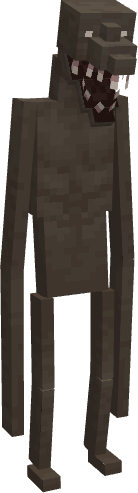
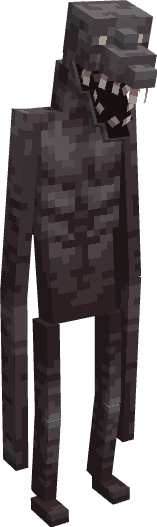
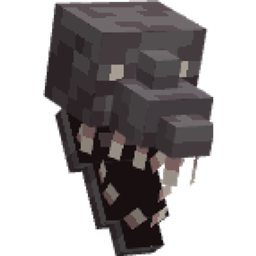
A new texture and model for the Cave Dweller that doesn't make it look too "modded"
by condescending_williams93
Download Claim this project
30,518 downloads
0 likes
Updated Oct 14, 2026
0 hypes
16x Mod Support
Advertisement Remove ads with Premium →

So, when most people want to make the Cave Dweller in their modpack look scarier, they usually go with any mod that includes the model from Schpalrbo's "Enhanced Cave Noise.jar".  However, my issue with their model is that it doesn't fit in Minecraft's style at all.  Even when compared to other "dwellers" like the Man from the Fog and the Midnight Lurker, the complexity and the amount cubes in the model make it stick out like a sore thumb.  However, even when compared to Frogballoon's "Scarier Cave Dwellers" resource pack, which tries to stick more with the Vanilla style, the Enhanced model still looks scarier.  So, I decided to make a Cave Dweller model that combined both Vanilla-look of Frogballoon's model and texture, and the basic shape of Schpalrbo's model.


By default, this pack will only work with Cave Dweller Evolved, Cave Dweller Reimagined, and other mods that use the Evolved AI.

Credit goes to Frogballoon for giving me permission use their pack, model, and texture as a base.  By all means they are the original author.

Update: I've made an alternate version of the pack with colors more reminiscent of the OG Cave Dweller (still using Frogballoon's texture as a base).
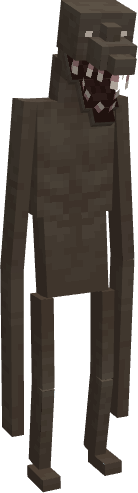

TrueCaveDweller(Gray)-1.20.1(fixed)
MC 1.20.1, 1.20
Release 2024-10-27 Get
TrueCaveDweller(Tan)-1.20.1(fixed)
MC 1.20.1, 1.20
Release 2024-10-27 Get
TrueCaveDweller(Tan)-1.19.2
MC 1.19.2
Release 2024-06-28 Get
TrueCaveDweller(Gray)-1.19.2
MC 1.19.2
Release 2024-01-24 Get

Requirements & install

How to use this resource pack in Minecraft
Resolution
16x
Minecraft
1.19.2 – 1.20.1
Install folder
.minecraft/resourcepacks

How to install resource packs

  1. Download the resource pack .zip file (do not extract it).
  2. In Minecraft open Options → Resource Packs → Open Pack Folder.
  3. Drop the .zip into the resourcepacks folder (.minecraft/resourcepacks).
  4. Move the pack to the Selected column and click Done.
Browse more: 16x resource packs 32x resource packs 64x resource packs 128x resource packs 256x resource packs 512x+ resource packs Resource Packs for 1.20.1 All resource packs
Advertisement Remove ads with Premium →

You Might Also Like