Mineuniverse
Resource Packs
Trims Overhaul (RP)

Trims Overhaul (RP)

RESOURCE PACK
Resource pack for Trims Overhaul
by ActuallyBlue
Download Claim this project
362 downloads
0 likes
0 followers
Updated Oct 14, 2026
0 hypes
Follow0
Data Packs
Advertisement Remove ads with Premium →

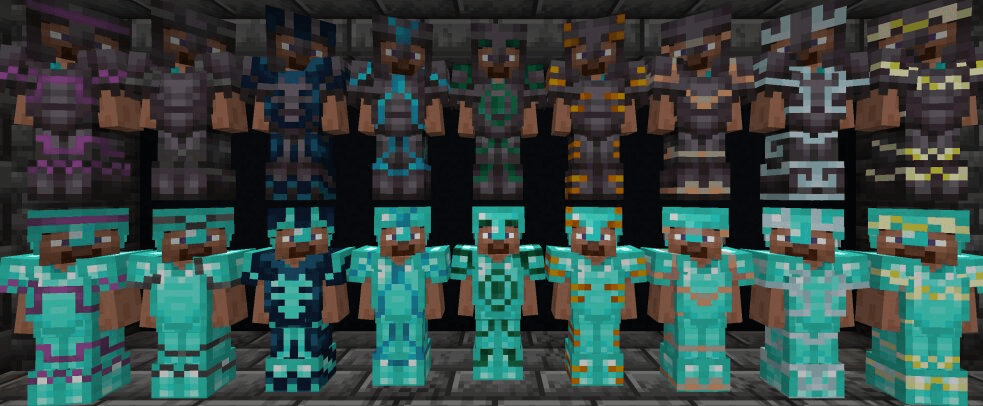
Separated resource pack for Trims Overhaul; highly recommended.


This is the exact same as whats bundled in the file for the Trims Overhaul datapack and mod.

---

Used for:
 - Armor models that use custom materials (Blaze Powder, Wind Charge, Nether Star, etc)
 - Death messages for a few specific abilities, like Tidal Burst, or occasional, like Harpoon.
 - Full translations for a dozen different languages
 - Improving the accuracy of spaces on some menus, mainly the admin Toggles Menu.
 - Also has a built-in fix for vanilla armor z-fighting on trims (Also has a separate project)
   - Also renames "Left Button" and "Right Button" to "Left Click" and "Right Click" (English-only)

Trims Overhaul v4.0.1 [Resources]
MC 1.21, 1.20.2, 1.19.4, 1.21.8, 1.20.5, 1.21.5, 1.21.4, 1.20.1, 1.20, 1.20.6, 1.21.1, 1.21.6, 1.21.3, 1.21.7, 1.20.4, 1.20.3, 1.21.2, 1.21.9, 1.21.10, 1.21.11, 26.1, 26.1.1
Release 2026-09-16 Get
Trims Overhaul v4.0.0 [Resources]
MC 1.21, 1.20.2, 1.19.4, 1.21.8, 1.20.5, 1.21.5, 1.21.4, 1.20.1, 1.20, 1.20.6, 1.21.1, 1.21.6, 1.21.3, 1.21.7, 1.20.4, 1.20.3, 1.21.2, 1.21.9, 1.21.10, 1.21.11, 26.1, 26.1.1
Release 2026-06-12 Get
Trims Overhaul v3.2.3 [Resources]
MC 1.21, 1.20.2, 1.19.4, 1.21.8, 1.20.5, 1.21.5, 1.21.4, 1.20.1, 1.20, 1.20.6, 1.21.1, 1.21.6, 1.21.3, 1.21.7, 1.20.4, 1.20.3, 1.21.2, 1.21.9, 1.21.10, 1.21.11, 26.1, 26.1.1
Release 2026-06-01 Get

Requirements & install

How to use this resource pack in Minecraft
Resolution
Not specified
Minecraft
1.21.6 – 26.1.1
Install folder
.minecraft/resourcepacks

How to install resource packs

  1. Download the resource pack .zip file (do not extract it).
  2. In Minecraft open Options → Resource Packs → Open Pack Folder.
  3. Drop the .zip into the resourcepacks folder (.minecraft/resourcepacks).
  4. Move the pack to the Selected column and click Done.
Browse more: 16x resource packs 32x resource packs 64x resource packs 128x resource packs 256x resource packs 512x+ resource packs Resource Packs for 26.1.1 All resource packs

More from ActuallyBlue

Advertisement Remove ads with Premium →

You Might Also Like