Mineuniverse
Resource Packs
Tree Seeds

Tree Seeds

RESOURCE PACK
No more saplings from leaves!
by Haikis
Download Claim this project
95,960 downloads
0 likes
Updated Oct 14, 2026
0 hypes
16x Miscellaneous
Advertisement Remove ads with Premium →

Why are the saplings falling out of the leaves? I have no idea either.

It's time to put an end to it!

(NO OPTIFINE NEEDED!)


Features
-Textures of saplings in inventory are now changed to corresponding tree seed
-Names of the saplings are changed to "Seed" (English)
-Saplings on the ground are looking just the same
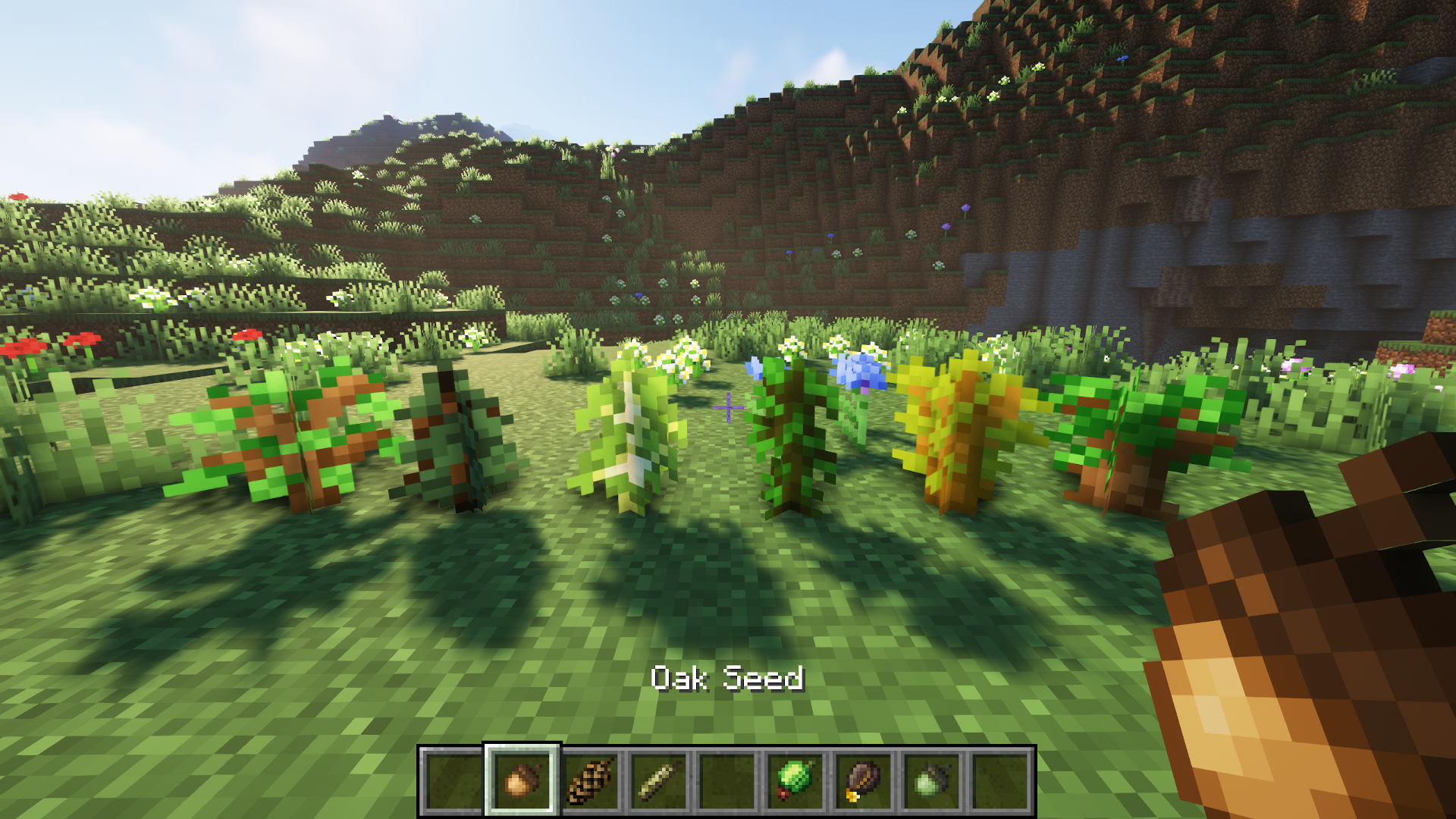
Credits to ferreusveritas owner of Dynamic Trees mod for beautiful textures =D

If you have feedback or request write them in the comments and I will try to help you.

TreeSeeds 26.3
MC 1.21.11-snapshot, 1.21.11, 26.1, 26.1.1, 26.1.2, 26.2, 26.3
Release 2026-03-27 Get
TreeSeeds v1.21.11
MC 1.21.11-snapshot, 1.21.11
Release 2025-12-16 Get
TreeSeeds 1.21.10
MC 1.21.9, 1.21.10, 1.21.9-snapshot
Release 2025-10-03 Get
TreeSeeds 1.21.8
MC 1.21.8
Release 2025-07-25 Get
TreeSeeds 1.21.7
MC 1.21.7
Release 2025-07-08 Get
TreeSeeds 1.21.6
MC 1.21.6-snapshot, 1.21.6
Release 2025-06-27 Get
TreeSeeds 1.21.4
MC 1.21.4, 1.21.4-Snapshot
Release 2024-12-25 Get
TreeSeeds 1.21.3
MC 1.20.2, 1.21.2-Snapshot, 1.21, 1.19.4-Snapshot, 1.20.5, 1.20.2-Snapshot, 1.20.5-Snapshot, 1.19.4, 1.21.1-Snapshot, 1.20.3-Snapshot, 1.20.3, 1.20.1, 1.20, 1.20.6, 1.20.4
Release 2024-12-02 Get
TreeSeeds 1.19+
MC 1.19-Snapshot, 1.19.1, 1.19
Release 2022-07-16 Get
TreeSeeds 1.16+
MC 1.16-Snapshot, 1.16.3, 1.16.1, 1.16, 1.16.5, 1.16.4, 1.16.2
Release 2022-07-16 Get
TreeSeeds 1.17+
MC 1.17.1, 1.17, 1.17-Snapshot
Release 2022-07-16 Get
Tree Seeds.zip
MC 1.16-Snapshot, 1.17.1, 1.16.3, 1.13.1, 1.15-Snapshot, 1.16.1, 1.18.1, 1.14.4, 1.14.1, 1.12.1, 1.17, 1.12, 1.14.3, 1.15, 1.16, 1.13, 1.16.5, 1.18.2, 1.15.2, 1.14, 1.17-Snapshot
Release 2022-02-12 Get

Requirements & install

How to use this resource pack in Minecraft
Resolution
16x
Minecraft
1.21.10 – 26.3
Install folder
.minecraft/resourcepacks

How to install resource packs

  1. Download the resource pack .zip file (do not extract it).
  2. In Minecraft open Options → Resource Packs → Open Pack Folder.
  3. Drop the .zip into the resourcepacks folder (.minecraft/resourcepacks).
  4. Move the pack to the Selected column and click Done.
Browse more: 16x resource packs 32x resource packs 64x resource packs 128x resource packs 256x resource packs 512x+ resource packs Resource Packs for 26.3 All resource packs

More from Haikis

Advertisement Remove ads with Premium →

You Might Also Like