Mineuniverse
Resource Packs
繁体字转简体字 简中转繁中 traditional Chinese to simplified

繁体字转简体字 简中转繁中 traditional Chinese to simplified

RESOURCE PACK
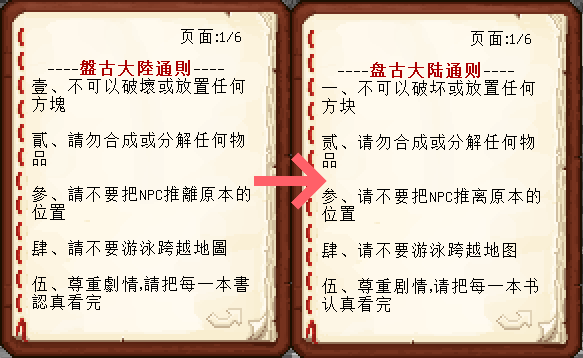
Display the traditional Chinese characters in signs and books as simplified characters
by hosecoin
Download Claim this project
Add a badge to your pageLink to 繁体字转简体字 简中转繁中 traditional Chinese to simplified from a README, website or forum post.
Preview: Badge

Badges update automatically and link to the resource pack page on MineUniverse.

3,171 downloads
0 likes
0 followers
Updated Oct 14, 2026
0 hypes
Follow0
16x Font Packs
Advertisement Remove ads with Premium →

将告示牌、书中的繁体字显示为简体字。

Display the traditional characters in signs and books as simplified


演示文字来源(screenshot from):盘灵古域地图

联系方式(contact information):qq 2935116344

bilibili账号(bilibili account number)

github上相关项目代码(project code on github)
繁转简 1.20及以上版本
MC 1.20.2, 1.21.2-Snapshot, 1.21, 1.20.5, 1.20.2-Snapshot, 1.20.5-Snapshot, 1.21.1-Snapshot, 1.20.3-Snapshot, 1.20.3, 1.20.1, 1.20, 1.20.6, 1.20.4, 1.21-Snapshot, 1.20-Snapshot, 1.21.1
Release 2024-08-18 Get
繁转简.zip
MC 1.7.6, 1.8.7, 1.7.4, 1.7.7, 1.19.3, 1.7.5, 1.6.1, 1.8.4, 1.7.9, 1.8.8, 1.19-Snapshot, 1.7.3, 1.7.2, 1.8-Snapshot, 1.8.3, 1.19.2, 1.8.6, 1.19.1, 1.7.8, 1.6.4, 1.7.10, 1.8
Release 2022-12-18 Get

Requirements & install

How to use this resource pack in Minecraft
Resolution
16x
Minecraft
1.20.5-Snapshot – 1.21.2-Snapshot
Install folder
.minecraft/resourcepacks

How to install resource packs

  1. Download the resource pack .zip file (do not extract it).
  2. In Minecraft open Options → Resource Packs → Open Pack Folder.
  3. Drop the .zip into the resourcepacks folder (.minecraft/resourcepacks).
  4. Move the pack to the Selected column and click Done.
Browse more: 16x resource packs 32x resource packs 64x resource packs 128x resource packs 256x resource packs 512x+ resource packs Resource Packs for 1.21.2-Snapshot All resource packs
Advertisement Remove ads with Premium →

You Might Also Like