Mineuniverse
Resource Packs
Totem of Undying Skin Template

Totem of Undying Skin Template

RESOURCE PACK
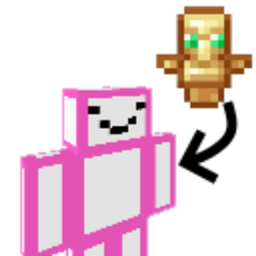
A template to make the TOU into your skin!
by Dropbois
Download Claim this project
Add a badge to your pageLink to Totem of Undying Skin Template from a README, website or forum post.
Preview: Badge

Badges update automatically and link to the resource pack page on MineUniverse.

12,063 downloads
0 likes
0 followers
Updated Oct 14, 2026
0 hypes
Follow0
16x
Advertisement Remove ads with Premium →

This pack is a template to change the Totem of Undying into your Minecraft skin model.

To use just follow the tutorial below. 


Example with my skin

How to use (important)


 First and most important step if your skin has a hat layer (the part of your skin that sticks out) is to make sure you flatten it to the base texture. Go to your favorite skin or image editor and take the textures on the hat layer copy it, then paste in on the base layer. Make sure to remove the hat layer then save the new skin somewhere, you don't have to make this your Minecraft skin just save the new image on your computer.


        original 


        edited

 Now open up the Recourse Pack folder and go to assets->minecraft->textures Then replace the image with the skin you saved. (make sure its named "totem_of_undying.png")


Open Minecraft and make sure it works, if the model works but the texture is pink and black then make sure the texture is named correctly.

Planned Features

  • Edit model so skin doesn't need to be flattened


TOU Skin Template.zip
MC 1.18.1, 1.18
Release 2022-02-19 Get

Requirements & install

How to use this resource pack in Minecraft
Resolution
16x
Minecraft
1.18 – 1.18.1
Install folder
.minecraft/resourcepacks

How to install resource packs

  1. Download the resource pack .zip file (do not extract it).
  2. In Minecraft open Options → Resource Packs → Open Pack Folder.
  3. Drop the .zip into the resourcepacks folder (.minecraft/resourcepacks).
  4. Move the pack to the Selected column and click Done.
Browse more: 16x resource packs 32x resource packs 64x resource packs 128x resource packs 256x resource packs 512x+ resource packs Resource Packs for 1.18.1 All resource packs

More from Dropbois

Advertisement Remove ads with Premium →

You Might Also Like