Mineuniverse
Resource Packs
TORREZX-GLOWING ORES ! (Emissive)

TORREZX-GLOWING ORES ! (Emissive)

RESOURCE PACK
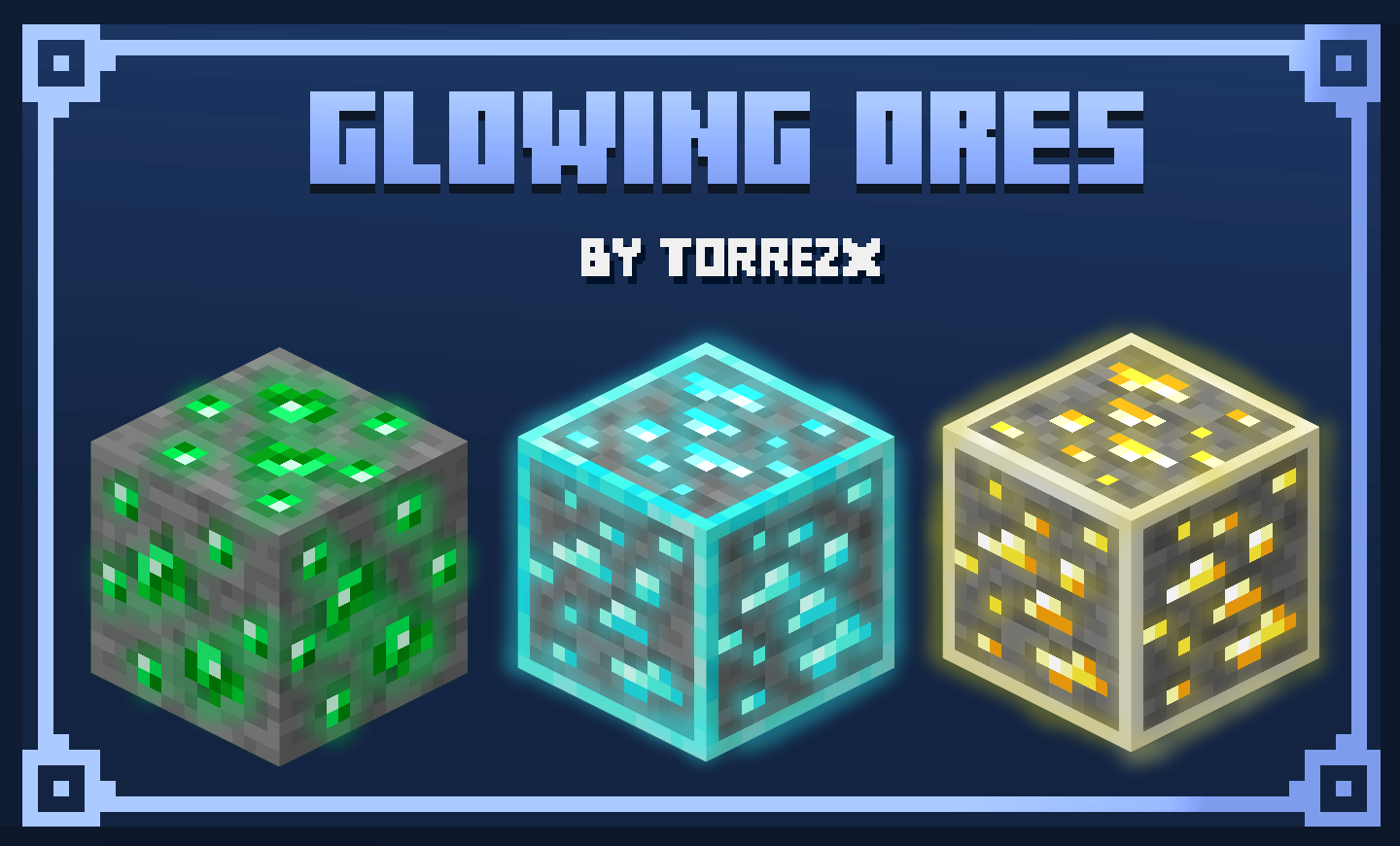
All the ores will now glow in the dark
by Torrezx
Download Claim this project
Add a badge to your pageLink to TORREZX-GLOWING ORES ! (Emissive) from a README, website or forum post.
Preview: Badge

Badges update automatically and link to the resource pack page on MineUniverse.

23,000 downloads
0 likes
0 followers
Updated Oct 14, 2026
0 hypes
Follow0
16x Miscellaneous Traditional
Advertisement Remove ads with Premium →

TORREZX-GLOWING ORES !


ESPAÑOL

Ahora todos los minerales brillaran en la oscuridad,perfecto para cuando no tengas antorchas para iluminar,y

esto tambien te ayuda a prevenir que olvides algun mineral.Esto afecta a todos los minerales existentes,inlcuso

a la netherite,en su caso esta brillara completamente el bloque entero


 Podra elegir entre 3 variantes del resourcepack para su comodidad

-Emissive ores classic-Solo afecta a los pixeles de los ores 

-Emissivo border ores-afecta a los pixeles de los ores y añade un borde del color deel ore

-Glow ores -Añade un borde como si los ores tuvieran el efecto de glowing

ENGLISH

Now all ores will glow in the dark, perfect for when you don't have torches to illuminate, and

This also helps prevent you from forgetting any minerals. This affects all existing minerals, even

to the netherite, in its case it will completely shine the entire block


You can choose between 3 variants of the resourcepack for your convenience

-Emissive ores classic-Only affects the pixels of the ores

-Emissive border flowers-affects the pixels of the flowers and adds a border of the color of the flower

-Glow flowers -Adds a border as if the flowers had the effect of glowing

Torrezx-Emissive_ores.zip
MC 1.20.1, 1.20
Release 2023-08-30 Get
Torrezx-Glow_ores.zip
MC 1.20.1, 1.20
Release 2023-08-29 Get

Requirements & install

How to use this resource pack in Minecraft
Resolution
16x
Minecraft
1.20 – 1.20.1
Install folder
.minecraft/resourcepacks

How to install resource packs

  1. Download the resource pack .zip file (do not extract it).
  2. In Minecraft open Options → Resource Packs → Open Pack Folder.
  3. Drop the .zip into the resourcepacks folder (.minecraft/resourcepacks).
  4. Move the pack to the Selected column and click Done.
Browse more: 16x resource packs 32x resource packs 64x resource packs 128x resource packs 256x resource packs 512x+ resource packs Resource Packs for 1.20.1 All resource packs

More from Torrezx

Advertisement Remove ads with Premium →

You Might Also Like