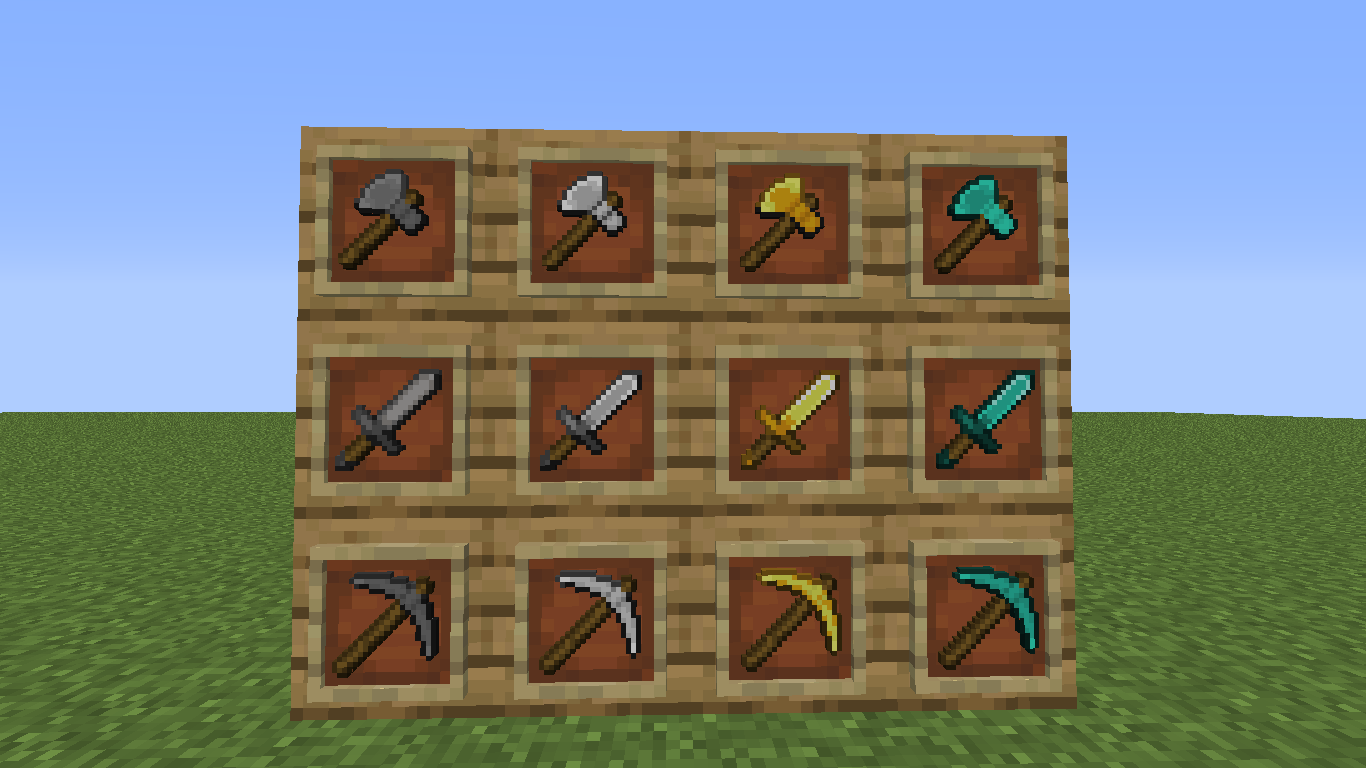
20x20 Refined Tools is a custom texture pack designed for players who crave the organic, curved aesthetic of high-resolution packs (like Faithful 32x) but want to maintain the lightning-fast performance of a lightweight pack.
By expanding the canvas from the standard 16x16 to a meticulously crafted 20x20, this pack introduces a level of detail and smoothness that feels premium without any impact on your FPS.
Organic Curvatures: Every tool head, from the humble wooden pickaxe to the mighty netherite axe, features a smooth, arched design that breaks the "blocky" feel of vanilla.
Structural Realism: Each tool showcases a unique assembly detail where the wooden handle pierces through the head of the tool, adding a layer of depth and authenticity.
Intelligent Shading: Materials aren't just color-swapped. Gold has a warm, specular glow, diamonds have a crystalline sharpness, and netherite features a rugged, reinforced handle for a truly legendary feel.
Optimized Proportions: The axes have been redesigned with a massive, heavy-hitting head and a slightly shorter handle to maximize their visual impact within the 20x20 grid.
Total Consistency: The color palettes are perfectly synced across the entire set. Your wooden sword, stone pickaxe, and diamond axe will look and feel like they belong to the same elite kit.
The 20x20 resolution is the "sweet spot" of pixel art. It allows for diagonal lines to look much smoother and materials to have more complex gradients, yet it remains extremely light on your hardware. It’s the perfect choice for competitive PvP, massive survival builds, or anyone who wants a "Faithful" look with zero lag.