Mineuniverse
Resource Packs
TidBit's Animal Pack

TidBit's Animal Pack

RESOURCE PACK
A pack providing some extra features for my family.
by TiddBitt
Download Claim this project
137 downloads
0 likes
0 followers
Updated Oct 14, 2026
0 hypes
Follow0
16x Miscellaneous Traditional
Advertisement Remove ads with Premium →

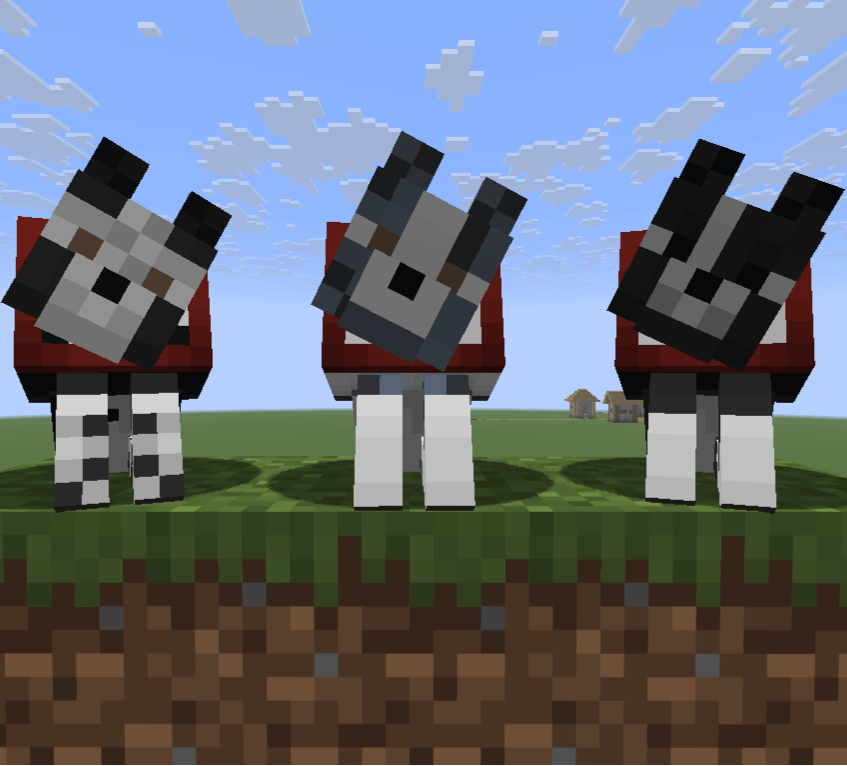
A simple resource pack adding my family's beloved pets into the game!
image

Apply a nametag with the following names to have the texture change!

  • Left - "Gillie"
  • Middle - "Vivian"
  • Right - "Mazzy"

Other names include:

"Ashoka" & "Jayda" - Black Labs

"Stella" - Corgi/Chihuahua mix
"Tommy" - Alternative Gray Parrot

"Peach" - White Parrot
"Sailor" - Alternative Black Cat
"Louis" - Russian Blue Cat

This pack also serves as a basic example of using nametags to access custom textures for mobs.

Known issues:
Some wolf variants not working for default (ashen) wolves.

TidBit's Animal Resource Pack.zip
MC 1.21.6-snapshot, 1.21.8, 1.21.5, 1.21.5-Snapshot, 1.21.6, 1.21.7, 1.21.9-snapshot, 1.21.9, 1.21.10, 1.21.11-snapshot, 1.21.11, 26.1-snapshot, 26.1, 26.1.1, 26.1.2, 26.2
Release 2026-07-02 Get

Requirements & install

How to use this resource pack in Minecraft
Resolution
16x
Minecraft
1.21.10 – 26.2
Install folder
.minecraft/resourcepacks

How to install resource packs

  1. Download the resource pack .zip file (do not extract it).
  2. In Minecraft open Options → Resource Packs → Open Pack Folder.
  3. Drop the .zip into the resourcepacks folder (.minecraft/resourcepacks).
  4. Move the pack to the Selected column and click Done.
Browse more: 16x resource packs 32x resource packs 64x resource packs 128x resource packs 256x resource packs 512x+ resource packs Resource Packs for 26.2 All resource packs
Advertisement Remove ads with Premium →

You Might Also Like