Badges update automatically and link to the resource pack page on MineUniverse.
Threads and Silks is designed to be an immersive clothing mod for Minecraft! This collection of resource packs requires the Threads and Silks mod and adds additional textures for the "custom" sets of equipment included in the mod.
See the Threads and Silks page for more details!
To install, expand the zip file into a folder and copy that folder into your "resourcepacks" folder for your Minecraft instance. In the options menu, open the Resource Packs option and move the downloaded pack to the right side of the screen.
The custom clothing can be grabbed from the creative menu or given using commands. The item pieces have identifiers matching "threads:custom_#_helmet", "threads:custom_#_chestplate", "threads:custom_#_leggings", and "threads:custom_#_boots".
These collections are intended as a template to be modified! You should be able to edit the textures in this pack to make whatever custom clothing you want for your own Minecraft stories. Currently, there are 16 individual equipment sets (from "custom_1" to "custom_16") that can be modified by editing "assets/minecraft/textures/models/armor/custom_#_layer_1.png" for the head, chest, and feet slots and "assets/minecraft/textures/models/armor/custom_#_layer_2.png" for the legs slot. You can also create your own inventory models by placing them into "assets/threads/textures/models/item/" with the names "custom_#_helmet.png", "custom_#_chestplate.png", "custom_#_leggings.png", and "custom_#_boots.png".
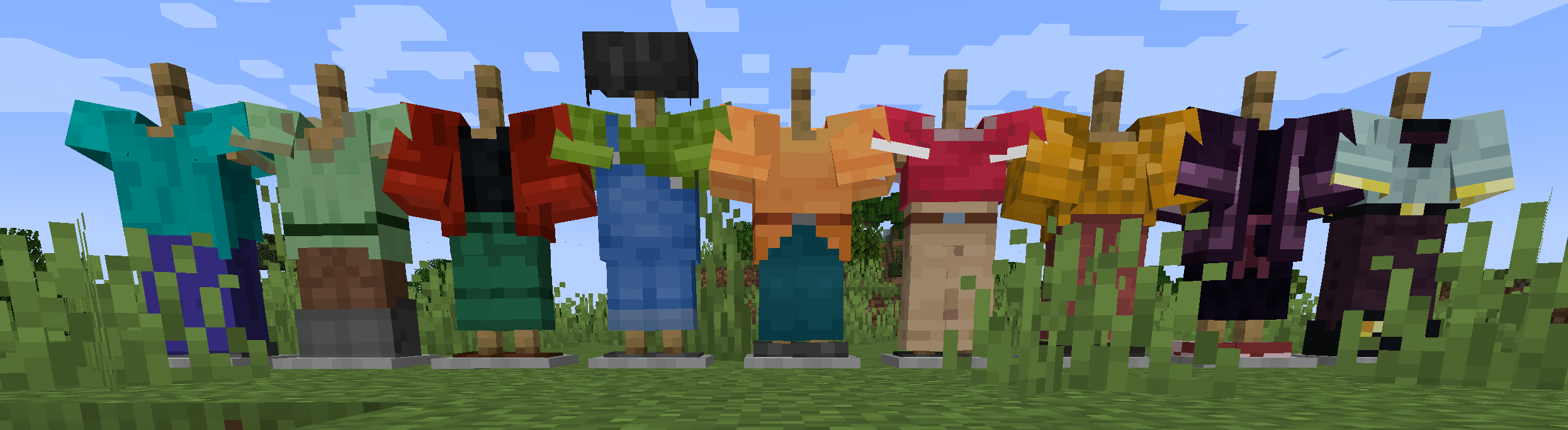 * TaS Default Skins: As an example of how to create a resource pack for this mod, this resource pack contains clothing that emulates the default Minecraft skins. You can wear Steve's shirt, Sunny's overalls, Efe's earring, and more!