Mineuniverse
Resource Packs
The Legend of Zelda: Phantom Hourglass HUD

The Legend of Zelda: Phantom Hourglass HUD

RESOURCE PACK
Phantom Hourglass HUD textures made by LGC
by LinkGreen100
Download Claim this project
Add a badge to your pageLink to The Legend of Zelda: Phantom Hourglass HUD from a README, website or forum post.
Preview: Badge

Badges update automatically and link to the resource pack page on MineUniverse.

7,250 downloads
0 likes
0 followers
Updated Oct 14, 2026
0 hypes
Follow0
16x
Advertisement Remove ads with Premium →

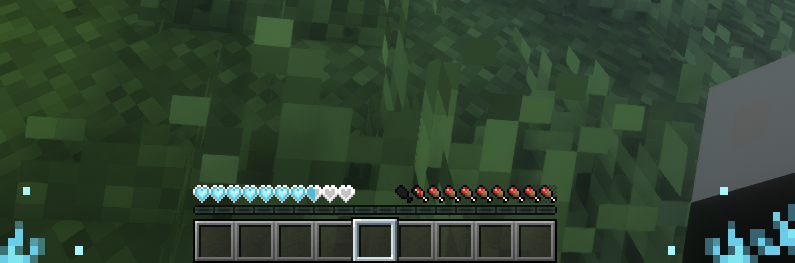
Inspiration taken from a beloved Legend of Zelda game on the Nintendo DS/DSi, I present to you the Phantom Hourglass HUD!


The Phantom Hourglass HUD makes changes to the HUD, such as your Hearts, Hunger, XP, and Hotbar. These texture changes are made to reflect the appearance seen in the Phantom Hourglass's HUD textures, like the Hearts for example.


This pack is just a small project, and is not intended to change any other textures other than the HUD, not including the inventory or the menus in any way. If anyone would like me to make a pack for those things, I can. Also, all textures you see will be 100% recreations reflecting the original textures.


This pack is a work in progress, and not all elements of the HUD will be changed.

For anyone wondering, you are allowed to use this pack in videos and modpacks and such freely. I do ask that you point others this way if they ask about the pack, and not claim that you made it, would you?


V1.0

- All Heart textures are changed to reflect those in Phantom Hourglass as much as possible, including Hardcore Hearts

- Attack Gauge texture changed just a little, because why not?

- A nice icon added to the pack

- Pack uploaded to forge by yours truly, for those who may be interested in the pack

Phantom Hourglass HUD - 1.0.zip
MC 1.16.3, 1.13.1, 1.9.3, 1.8.7, 1.7.4, 1.7.7, 1.7.6, 1.16-Snapshot, 1.17.1, 1.9.1, 1.15-Snapshot, 1.7.5, 1.6.1, 1.16.1, 1.18.1, 1.14.3, 1.15, 1.16, 1.13, 1.19-Snapshot, 1.7.3
Release 2024-02-18 Get

Requirements & install

How to use this resource pack in Minecraft
Resolution
16x
Minecraft
1.15 – 1.19-Snapshot
Install folder
.minecraft/resourcepacks

How to install resource packs

  1. Download the resource pack .zip file (do not extract it).
  2. In Minecraft open Options → Resource Packs → Open Pack Folder.
  3. Drop the .zip into the resourcepacks folder (.minecraft/resourcepacks).
  4. Move the pack to the Selected column and click Done.
Browse more: 16x resource packs 32x resource packs 64x resource packs 128x resource packs 256x resource packs 512x+ resource packs Resource Packs for 1.19-Snapshot All resource packs
Advertisement Remove ads with Premium →

You Might Also Like