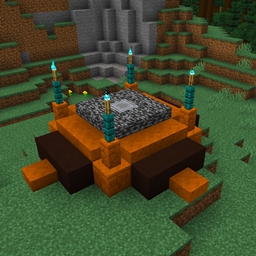
The old Gods were silent, their altar vacant. As they faded from traditions and memories, lives went on... until now. Today, they chose you - long may you regret stepping onto the altar this day.
In the "Chosen" Minecraft challenge pack, you take the role of the Gods' Chosen. At dawn every day, the Gods will demand their Chosen make a sacrifice at the altar, and their whims and desires are mighty specific.
As days go on, the difficulty of these requests will increase. Failing to deliver is costly - the wrath of the Gods takes away two hearts of maximum health.
Chosen is a hardcore challenge of survival - dying ends the challenge and displays your final statistics, including your score represented by the number of seconds you stayed alive.
To play Chosen, install the datapack in a world of your liking. Use the chat menu to select a starting point and start the game.
You can play alone or together with friends - the challenge applies to all players who are online, and completing the day's sacrifice is done together.
If you want to compete, you can do so by playing the same challenge. This is done by selecting a Seed. The same seed will always produce the same sequence of sacrifice demands, so playing a round of Chosen in the same world and with the same seed becomes a challenge of who can last the longest.