Mineuniverse
Resource Packs
TFYNF ENHANCED

TFYNF ENHANCED

RESOURCE PACK
TFYNF YT pack
by TFYNF
Download Claim this project
10 downloads
0 likes
Updated Oct 14, 2026
0 hypes
32x Data Packs
Advertisement Remove ads with Premium →

TFYNF YT Enhanced

TFYNF YT Enhanced is a personal enhanced-vanilla Minecraft resource pack built around the Faithful 64x visual style.

The pack preserves the smooth, high-resolution appearance of Faithful while adding several custom visual changes made for personal gameplay.

Features

  • Faithful 64x block, item, entity, armour, tool, GUI, and font textures
  • Custom animated water
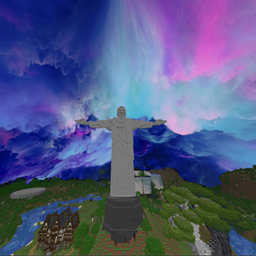
  • Custom galaxy looking sky
  • Enhanced night sky and stars
  • Custom TFYNF-branded hotbar
  • Custom pack icon and description
  • Designed for Minecraft Java 26.1.2
  • Newer textures not included in the original base pack may use vanilla Minecraft textures

Requirements

The custom sky may require a compatible custom-sky renderer such as Skyboxify, FabricSkyBoxes, or OptiFine, depending on your Minecraft setup.

Credits and Licence

This is an unofficial fan-made modified resource pack and is not affiliated with or endorsed by Faithful, Mojang, or Microsoft.

The majority of the base textures originate from the Faithful 64x Resource Pack.

Faithful Resource Pack:
https://faithfulpack.net/

Faithful assets remain subject to the Faithful Licence Version 3. The original Faithful licence is included unmodified inside the downloaded ZIP.

Custom TFYNF hotbar, water changes, pack branding, and other personal modifications including sky were created for this edition.

This project is not monetised and must not be sold, placed behind a paywall, or redistributed commercially.

TFYNF ENHANCED MC 2026.zip
MC 26.1.2
Release 2026-06-15 Get

Requirements & install

How to use this resource pack in Minecraft
Resolution
32x
Minecraft
26.1.2
Install folder
.minecraft/resourcepacks

How to install resource packs

  1. Download the resource pack .zip file (do not extract it).
  2. In Minecraft open Options → Resource Packs → Open Pack Folder.
  3. Drop the .zip into the resourcepacks folder (.minecraft/resourcepacks).
  4. Move the pack to the Selected column and click Done.
Browse more: 16x resource packs 32x resource packs 64x resource packs 128x resource packs 256x resource packs 512x+ resource packs Resource Packs for 26.1.2 All resource packs
Advertisement Remove ads with Premium →

You Might Also Like