Mineuniverse
Resource Packs
 Sweety's Items (Alex's Mobs)

Sweety's Items (Alex's Mobs)

RESOURCE PACK
Modernised and more consistent textures for Alex's Mobs items
by Sweetygamer
Download Claim this project
Add a badge to your pageLink to Sweety's Items (Alex's Mobs) from a README, website or forum post.
Preview: Badge

Badges update automatically and link to the resource pack page on MineUniverse.

3,754,263 downloads
0 likes
0 followers
Updated Oct 14, 2026
0 hypes
Follow0
16x Mod Support Traditional
Advertisement Remove ads with Premium →

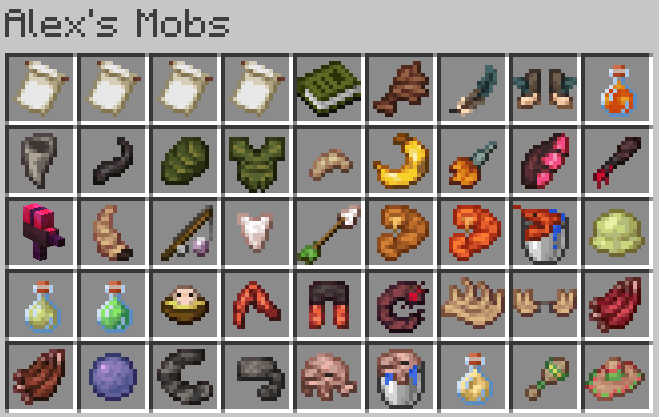
Sweety's Items is a simple texture pack, providing refreshed textures to Alex's Mobs items. This pack affect most items, but ONLY items. Blocks and Mobs weren't touched in any way.


-> All assets can be previewed under the Media tab

Why this texture pack :

Due to how much time Alex's Mobs have been running for, and with a lot of texture being over 5 years old, some of the mods assets can be inconsistent with vanilla textures, and even, in some cases, other textures from the mod itself. With the focus of the mod being its many animals and monsters, items seems to have been overlooked by the team and content creators.

To solve partially this issue, i decided to create a small texture pack, providing a uniform and more modern look to the mod's item textures. Some of the textures fitting close enough to my vision were left untouched.


Credits :

This project is unaffiliated with the Alex's Mobs team. Some of the textures included are modified versions of Alex's Mobs assets, so this project complies with Alex's Mobs GNU Lesser General Public License


1.0 [1.16]
MC 1.16.3, 1.16.1, 1.16, 1.16.5, 1.16.2, 1.16.4
Release 2026-01-05 Get
1.0 [1.17]
MC 1.17.1, 1.17
Release 2026-01-05 Get
1.0 [1.18]
MC 1.18.1, 1.18, 1.18.2
Release 2026-01-05 Get
1.0 [1.19]
MC 1.19.3, 1.19.4, 1.19.1, 1.19.2, 1.19
Release 2026-01-04 Get
1.0 [1.20]
MC 1.20.1, 1.20
Release 2026-01-04 Get
1.0 [1.21]
MC 1.21, 1.21.1
Release 2026-01-04 Get

Requirements & install

How to use this resource pack in Minecraft
Resolution
16x
Minecraft
1.19.1 – 1.21.1
Install folder
.minecraft/resourcepacks

How to install resource packs

  1. Download the resource pack .zip file (do not extract it).
  2. In Minecraft open Options → Resource Packs → Open Pack Folder.
  3. Drop the .zip into the resourcepacks folder (.minecraft/resourcepacks).
  4. Move the pack to the Selected column and click Done.
Browse more: 16x resource packs 32x resource packs 64x resource packs 128x resource packs 256x resource packs 512x+ resource packs Resource Packs for 1.21.1 All resource packs

More from Sweetygamer

Advertisement Remove ads with Premium →

You Might Also Like