Badges update automatically and link to the resource pack page on MineUniverse.
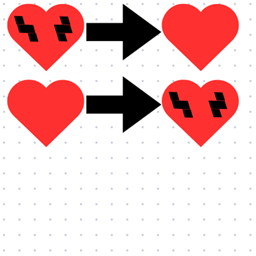
This texture pack swaps several visual elements between Minecraft's Hardcore Mode and Survival Mode, while also changing the chat mute buttons and crosshair.
When the pack is enabled:
Hardcore hearts look like Survival hearts.
Survival hearts look like Hardcore hearts.
The Chat Mute and Unmute buttons are swapped.
The button that normally says Mute will appear as Unmute.
The button that normally says Unmute will appear as Mute.
These changes are visual only. The actual Hardcore and Survival mechanics remain unchanged.
The actual chat mute and unmute functions also remain unchanged.
The texture pack also replaces the normal Minecraft crosshair with a different custom crosshair.
The crosshair has its own separate visual change and is not related to the Hardcore and Survival heart swap or the Chat Mute and Unmute button swap.
The pack is designed to make Minecraft feel familiar but noticeably wrong.
Hardcore hearts look like Survival hearts, Survival hearts look like Hardcore hearts, the Chat Mute and Unmute buttons are backwards, and the crosshair has been replaced with a different design.
Nothing about the actual gameplay is changed. It is entirely a visual texture pack designed to create a confusing and unusual Minecraft experience.