Mineuniverse
Resource Packs
Subtle Font Tweaks

Subtle Font Tweaks

RESOURCE PACK
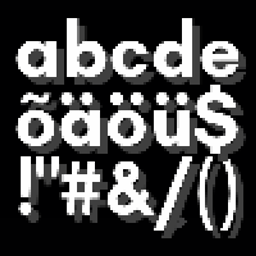
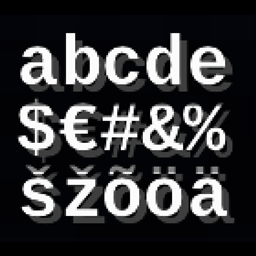
This subtle Minecraft font pack makes lowercase letters smaller and rounder and centers capitalized letters. They are minor changes with a fresh new feel.
by Beast135
Download Claim this project
Add a badge to your pageLink to Subtle Font Tweaks from a README, website or forum post.
Preview: Badge

Badges update automatically and link to the resource pack page on MineUniverse.

334,287 downloads
0 likes
0 followers
Updated Oct 14, 2026
0 hypes
Follow0
Font Packs Miscellaneous Traditional
Advertisement Remove ads with Premium →

Subtle Font Tweaks

Are you tired of the default Minecraft font but not looking for something completely different? This font pack adds small changes to the default font we've all been looking at for years.

  • Centered Capitals: No more off-balance upper-case letters.
  • Rounder, Smaller Lowercase: Lower case got a height adjustment are got their own minor tweaks
  • Subtle Adjustments: ☆ Other small things ☆

Whether you’re looking for a minor refresh or something new, this font pack is for those who enjoy subtle vanilla changes.


CurseForge Modrinth Discord

Subtle Font Tweaks v2.1
MC 1.16.3, 1.13.1, 1.17.1, 1.21, 1.16.1, 1.18.1, 1.14.3, 1.15, 1.16, 1.13, 1.16.5, 1.19.3, 1.20.2, 1.19.4, 1.21.8, 1.14.4, 1.14.1, 1.17, 1.20.5, 1.21.5, 1.18, 1.21.4, 1.20.1
Release 2026-05-01 Get
Subtle Font Tweaks v2.2
MC 1.16.3, 1.13.1, 1.17.1, 1.21, 1.16.1, 1.18.1, 1.14.3, 1.15, 1.16, 1.13, 1.16.5, 1.19.3, 1.20.2, 1.19.4, 1.21.8, 1.14.4, 1.14.1, 1.17, 1.20.5, 1.21.5, 1.18, 1.21.4, 1.20.1
Release 2026-05-01 Get
Subtle Font Tweaks v2.0
MC 1.16-Snapshot, 1.17.1, 1.16.3, 1.13.1, 1.19.3, 1.20.2, 1.21.2-Snapshot, 1.21, 1.21.6-snapshot, 1.15-Snapshot, 1.16.1, 1.18.1, 1.19.4-Snapshot, 1.20.5, 1.21.5, 1.14.4, 1.14.1, 1.17
Release 2025-04-21 Get
Subtle FontTweaks v1.0
MC 1.17.1, 1.16.3, 1.13.1, 1.19.3, 1.20.2, 1.21, 1.16.1, 1.18.1, 1.20.5, 1.21.5, 1.14.4, 1.14.1, 1.17, 1.14.3, 1.15, 1.16, 1.13, 1.19.4, 1.16.5, 1.21.4, 1.18.2, 1.19.2, 1.20.3
Release 2025-03-27 Get

Requirements & install

How to use this resource pack in Minecraft
Resolution
Not specified
Minecraft
1.20.3 – 1.21.8
Install folder
.minecraft/resourcepacks

How to install resource packs

  1. Download the resource pack .zip file (do not extract it).
  2. In Minecraft open Options → Resource Packs → Open Pack Folder.
  3. Drop the .zip into the resourcepacks folder (.minecraft/resourcepacks).
  4. Move the pack to the Selected column and click Done.
Browse more: 16x resource packs 32x resource packs 64x resource packs 128x resource packs 256x resource packs 512x+ resource packs Resource Packs for 1.21.8 All resource packs

More from Beast135

Advertisement Remove ads with Premium →

You Might Also Like