Mineuniverse
Resource Packs
String Highlighter

String Highlighter

RESOURCE PACK
A simple Minecraft resource pack that turns hard-to-see gray placed string into bright, highly visible neon orange.
by legend242900
Download Claim this project
27 downloads
0 likes
Updated Oct 14, 2026
0 hypes
16x Miscellaneous Modern
Advertisement Remove ads with Premium →

String Highlighter

Tired of tripping over invisible tripwires? Can’t find where you placed your string? String Highlighter is a simple, lightweight resource pack that turns hard-to-see gray string into a bright, glowing orange color!

Now you can see every single piece of placed string instantly. It is perfect for technical players, redstone builders, and anyone who wants to avoid accidental traps.
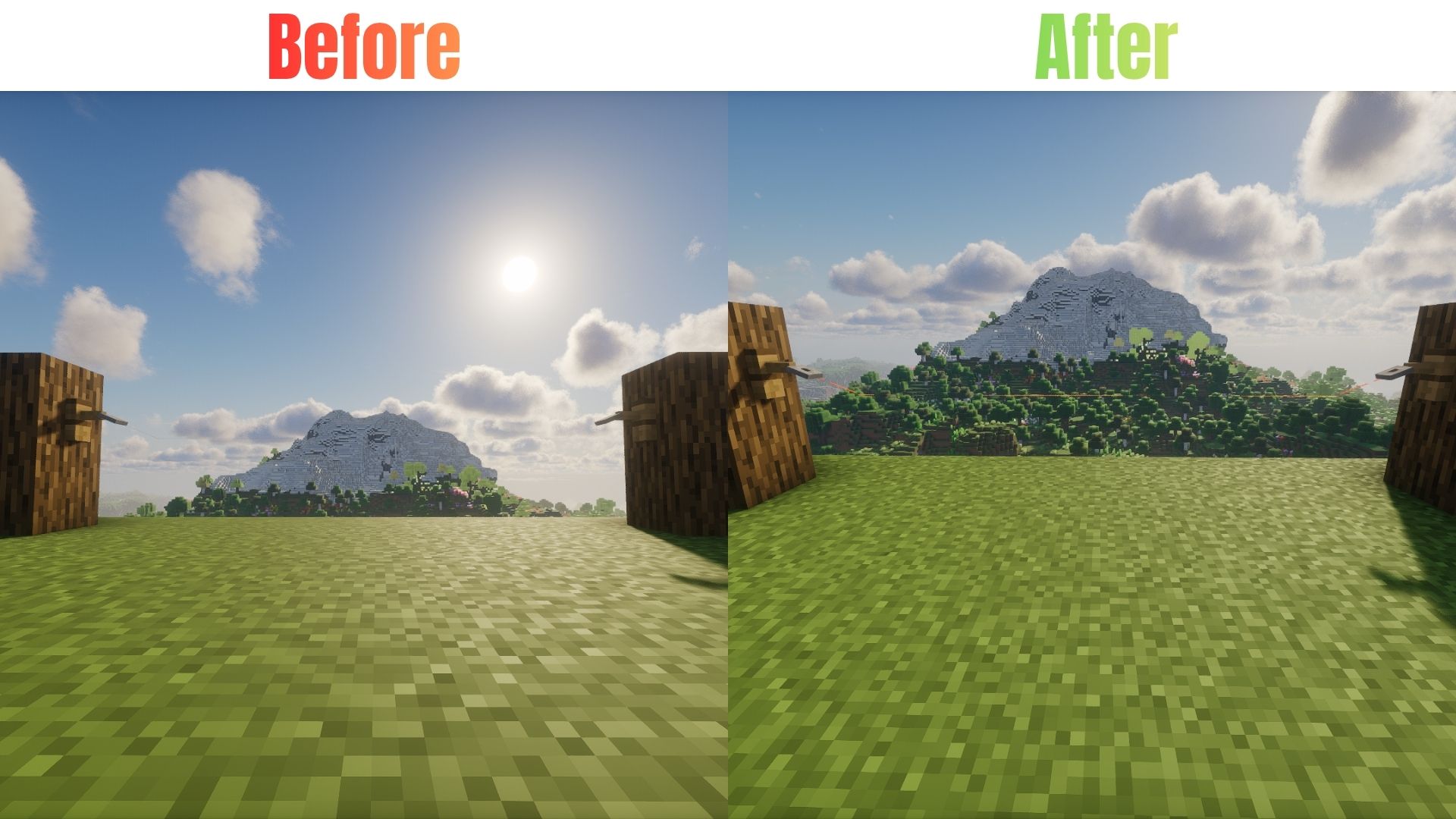
Comparison Table

Features

  • High Visibility: Changes dull gray placed string to bright neon orange.
  • Easy Redstone: See your tripwire lines clearly from far away.
  • PvP Safe: Never run into a hidden tripwire trap in faction or minigame servers again.
  • Pure Vanilla: Requires zero mods! It works 100% as a standard resource pack.
  • Lag Free: Uses basic textures so your game performance stays perfectly smooth.

🛠️ Installation

For Java Edition:

  1. Download the .zip file for your Minecraft version.
  2. Open Minecraft and navigate to Options > Resource Packs > Open Pack Folder.
  3. Drop the downloaded .zip file into the folder.
  4. Activate the pack in-game and move it to the top of your active pack list.

For Bedrock Edition:

  1. Download the .mcpack file.
  2. Double-click the file to automatically launch Minecraft and import the pack.
  3. Go to Settings > Global Resources > My Packs and click Activate.

Availability

Java Edition: Download right here on Modrinth & Curseforge!

Bedrock Edition: Available on our CurseForge page (Bedrock)

String_Highlighter_1_21_5.zip
MC 1.21.5
Release 2026-10-04 Get
String_Highlighter_1_21_6.zip
MC 1.21.6
Release 2026-10-04 Get
String_Highlighter_1_21_7_8.zip
MC 1.21.8, 1.21.7
Release 2026-10-04 Get
String_Highlighter_1_21_9_10.zip
MC 1.21.9, 1.21.10
Release 2026-10-04 Get
String_Highlighter_1_21_11.zip
MC 1.21.11
Release 2026-10-04 Get
String_Highlighter_26_2.zip
MC 26.2
Release 2026-10-04 Get
String_Highlighter_26_3.zip
MC 26.3
Release 2026-10-04 Get

Requirements & install

How to use this resource pack in Minecraft
Resolution
16x
Minecraft
1.21.6 – 26.3
Install folder
.minecraft/resourcepacks

How to install resource packs

  1. Download the resource pack .zip file (do not extract it).
  2. In Minecraft open Options → Resource Packs → Open Pack Folder.
  3. Drop the .zip into the resourcepacks folder (.minecraft/resourcepacks).
  4. Move the pack to the Selected column and click Done.
Browse more: 16x resource packs 32x resource packs 64x resource packs 128x resource packs 256x resource packs 512x+ resource packs Resource Packs for 26.3 All resource packs

More from legend242900

Advertisement Remove ads with Premium →

You Might Also Like