Mineuniverse
Resource Packs
Southern Railway Q1 for Immersive Railroading

Southern Railway Q1 for Immersive Railroading

RESOURCE PACK
Bulleid Q1 for Immersive Railroading
by INNARDS
Download Claim this project
Add a badge to your pageLink to Southern Railway Q1 for Immersive Railroading from a README, website or forum post.
Preview: Badge

Badges update automatically and link to the resource pack page on MineUniverse.

4,951 downloads
0 likes
0 followers
Updated Oct 14, 2026
0 hypes
Follow0
16x Modern Photo Realistic Steampunk
Advertisement Remove ads with Premium →

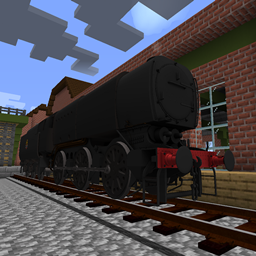
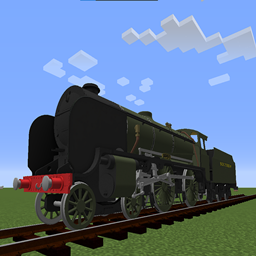
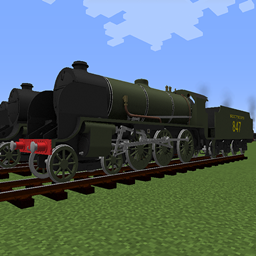
The SR Q1 class is a type of austerity steam locomotive constructed during the Second World War. The class was designed by Oliver Bulleid for use on the intensive freight turns experienced during wartime on the Southern Railway network. A total of 40 locomotives were built. Bulleid incorporated many innovations and weight-saving concepts to produce a highly functional design. The class lasted in service until July 1966, and the first member of the class, number C1, has been preserved by the National Railway Museum.

The highly unusual and controversial design represents the ultimate development of the British 0-6-0 freight engine, capable of hauling trains that were usually allocated to much larger locomotives on other railways. Nicknames for the class included "Ugly Ducklings", "Coffee Pots", "Charlies", "Biscuit Tins", "Biscuit Barrels", "Clockworks" and "Frankensteins". - Wikipedia

Adds the Southern Railway Q1 for the Immersive Railroading mod, this resource pack requires Immersive Railroading to work.

Liveries:
BR Black
SR Black with Bulleid "Sunshine" lettering

sr_q1.zip
MC 1.16.5, 1.11, 1.15.2, 1.10, 1.7.10, 1.14.2, 1.12.2
Release 2022-08-28 Get

Requirements & install

How to use this resource pack in Minecraft
Resolution
16x
Minecraft
1.7.10 – 1.16.5
Install folder
.minecraft/resourcepacks

How to install resource packs

  1. Download the resource pack .zip file (do not extract it).
  2. In Minecraft open Options → Resource Packs → Open Pack Folder.
  3. Drop the .zip into the resourcepacks folder (.minecraft/resourcepacks).
  4. Move the pack to the Selected column and click Done.
Browse more: 16x resource packs 32x resource packs 64x resource packs 128x resource packs 256x resource packs 512x+ resource packs Resource Packs for 1.16.5 All resource packs

More from INNARDS

Advertisement Remove ads with Premium →

You Might Also Like