Mineuniverse
Resource Packs
Small Utills

Small Utills

RESOURCE PACK
A small and clean utility pack that improves gameplay without covering or cluttering your screen
by GAMER_TIGE99
Download Claim this project
2,453 downloads
0 likes
Updated Oct 14, 2026
0 hypes
16x Modern Traditional
Advertisement Remove ads with Premium →

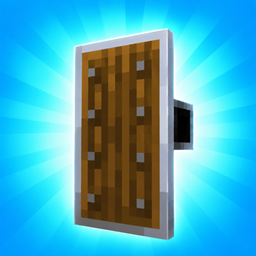
Small Utils is a lightweight utility resource pack designed to improve clarity while keeping your screen clean and distraction-free.

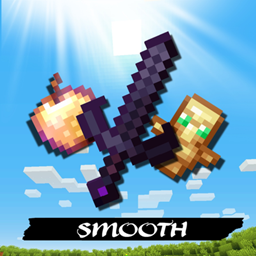
It enhances important PvP and survival items like the Totem of Undying, Golden Apple, and Water Bucket, making them easier to see and use in fast situations — without adding heavy visuals or unnecessary effects.

This pack focuses on small, smart tweaks that improve gameplay while preserving the vanilla feel.


⚡ Features

- Clearer Totem visibility

- Enhanced Golden Apple clarity

- small Water Bucket

- Minimal design

- No screen clutter

- all items small
Lightweight & performance friendly

🎮 Perfect For

- PvP players

- Clutch situations

- Survival gameplay

- Players who prefer clean and small items

Small Utills 26.2.zip
MC 26.2
Release 2026-09-17 Get
Small Utills 26.3.zip
MC 26.3
Release 2026-09-17 Get
Small Utills 26.1.x.zip
MC 26.1, 26.1.1, 26.1.2
Release 2026-08-19 Get
Small Utills.zip
MC 1.21.2-Snapshot, 1.21, 1.21.6-snapshot, 1.21.1-Snapshot, 1.21.8, 1.21.5, 1.21.4, 1.21.5-Snapshot, 1.21.1, 1.21.6, 1.21.3, 1.21.7, 1.21-Snapshot, 1.21.4-Snapshot, 1.21.2
Release 2026-08-08 Get
Small Utills 1.20.x.zip
MC 1.20.2-Snapshot, 1.20.5-Snapshot, 1.20.2, 1.20.5, 1.20.1, 1.20, 1.20.6, 1.20-Snapshot, 1.20.4, 1.20.3-Snapshot, 1.20.3
Release 2026-07-01 Get
Small Utills 1.19.x.zip
MC 1.19-Snapshot, 1.19.3, 1.19.4, 1.19.4-Snapshot, 1.19.1, 1.19.2, 1.19, 1.19.3-Snapshot
Release 2026-06-23 Get

Requirements & install

How to use this resource pack in Minecraft
Resolution
16x
Minecraft
1.21.6 – 26.3
Install folder
.minecraft/resourcepacks

How to install resource packs

  1. Download the resource pack .zip file (do not extract it).
  2. In Minecraft open Options → Resource Packs → Open Pack Folder.
  3. Drop the .zip into the resourcepacks folder (.minecraft/resourcepacks).
  4. Move the pack to the Selected column and click Done.
Browse more: 16x resource packs 32x resource packs 64x resource packs 128x resource packs 256x resource packs 512x+ resource packs Resource Packs for 26.3 All resource packs

More from GAMER_TIGE99

Advertisement Remove ads with Premium →

You Might Also Like