Mineuniverse
Resource Packs
Simply Swords  Whimscape add-on

Simply Swords Whimscape add-on

RESOURCE PACK
Texture support for the Simply Swords mod on the Whimscape resourcepack!
by xkadejx
Download Claim this project
Add a badge to your pageLink to Simply Swords Whimscape add-on from a README, website or forum post.
Preview: Badge

Badges update automatically and link to the resource pack page on MineUniverse.

3,910,154 downloads
0 likes
0 followers
Updated Oct 14, 2026
0 hypes
Follow0
16x Animated Traditional
Advertisement Remove ads with Premium →

Simply Swords - Whimscape


This resourcepack is meant for people playing with both the Simply Swords mod and Whimscape resourcepack!
It makes the Simply Swords textures better fit in with the rest of the Whimscape textures.

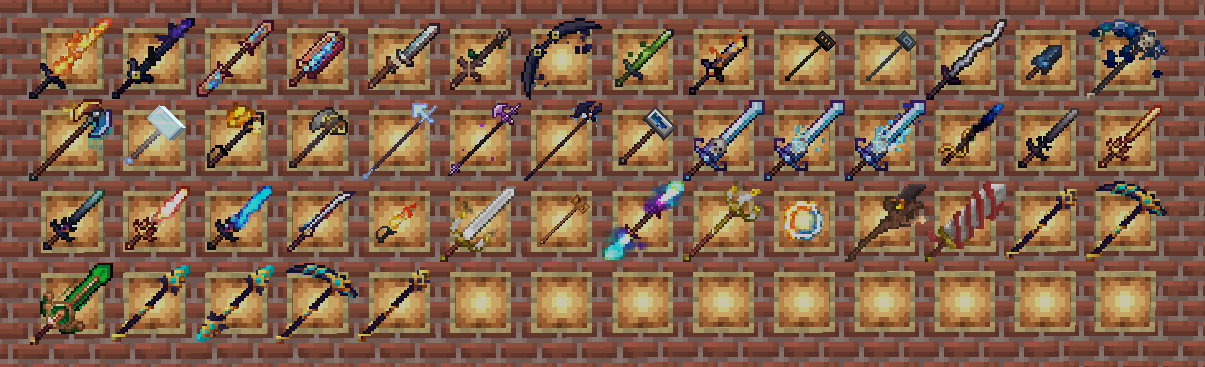
Here you can see some of the new textures this resourcepack will display:
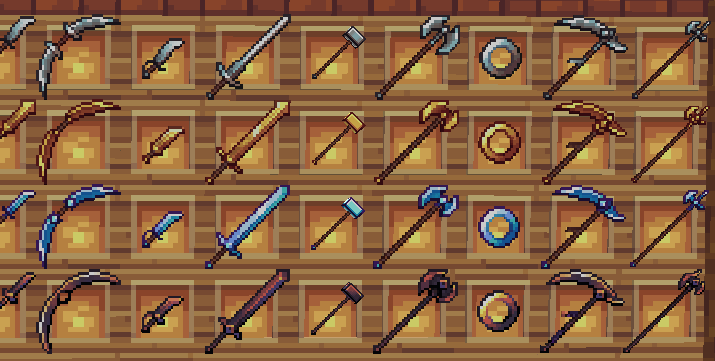
  • There's alternative versions for all scythes!
    Scythes have their edge reversed by default, I just think they look cooler and better fit the Better Combat animations, to un-reverse them you can:
        1.  Download this resourcepack
        2.  Extract the files from the .zip
        3.  Find the scythes in *\assets\simplyswords\textures\item
        4.  Delete the textures that are called "material_scythe.png"
        5.  Find the textures called "material_scythe_alt.png"
        6.  Rename these textures to "material_scythe.png"


Huge thanks to Kavast for making such a pretty resourcepack and letting us make our own mod support add-ons!

Simply Swords Whimscape - v1.1
MC 1.18.1, 1.18.2, 1.19.2, 1.20.1, 1.20, 1.19.1, 1.21.1, 1.18, 1.19
Release 2025-07-09 Get
Simply Swords Whimscape v1.0 1.20-1.20.1
MC 1.20.1, 1.20
Release 2024-10-21 Get
Simply Swords Whimscape 1.20-1.20.1
MC 1.20.1, 1.20
Beta 2024-10-20 Get

Requirements & install

How to use this resource pack in Minecraft
Resolution
16x
Minecraft
1.18.1 – 1.21.1
Install folder
.minecraft/resourcepacks

How to install resource packs

  1. Download the resource pack .zip file (do not extract it).
  2. In Minecraft open Options → Resource Packs → Open Pack Folder.
  3. Drop the .zip into the resourcepacks folder (.minecraft/resourcepacks).
  4. Move the pack to the Selected column and click Done.
Browse more: 16x resource packs 32x resource packs 64x resource packs 128x resource packs 256x resource packs 512x+ resource packs Resource Packs for 1.21.1 All resource packs
Advertisement Remove ads with Premium →

You Might Also Like