Mineuniverse
Resource Packs
Simply Swords 3D

Simply Swords 3D

RESOURCE PACK
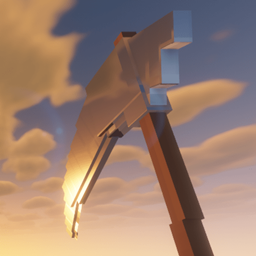
adds 3d models for weapons from simply swords and it uses vanilla textures which makes it compatible with resource packs and shaders, so you can have shiny weapons.
by Bombingham
Download Claim this project
Add a badge to your pageLink to Simply Swords 3D from a README, website or forum post.
Preview: Badge

Badges update automatically and link to the resource pack page on MineUniverse.

15,241 downloads
0 likes
0 followers
Updated Oct 14, 2026
0 hypes
Follow0
32x Mod Support
Advertisement Remove ads with Premium →

3d shiny reflective models for some weapons from simply swords mod

Last update, v2.1:

  • made new models for caelestis, shadowsting, tainted relic, harbinger, flamewind, emberlash, magiblade, magispear, decaying relic; which were not covered by Simply Swords Reforged. So now all weapons are 3d.
  • tweaked halberd again

REQUIREMENTS:

For vanilla gear use Tools 3d (reflective with shaders but pictures don't show it) and for 3d armor use Armory Conglomery


old changelog

v2

  • overhauled all textures
  • overhauled some models
  • completely remade halberd

v1

  • Added 3d models for Stick n' Stone
  • COMPLETELY NEW HALBERD MODELS FOR ALL TIERS
  • Adjusted greataxe, greathammer and glaive models

release

  • Basic edit of Simply Swords Classic resource pack by sweenuss, just made it use vanilla textures.


MOST CREDIT GOES TO SWEENUS FOR THE BASE MODELS, I just reverse engineered the code to learn modeling and did a ton of tweaks

 

Simply Swords 3D v2.1
MC 1.19.3, 1.20.2, 1.21, 1.18.1, 1.20.5, 1.21.5, 1.19.4, 1.21.4, 1.18.2, 1.19.2, 1.20.3, 1.20.1, 1.20, 1.20.6, 1.19.1, 1.20.4, 1.21.3, 1.21.1, 1.18, 1.19, 1.21.2
Release 2025-04-10 Get
Simply Swords 3D v2.zip
MC 1.19.3, 1.20.2, 1.21, 1.18.1, 1.20.5, 1.19.4, 1.18.2, 1.19.2, 1.20.3, 1.20.1, 1.20, 1.20.6, 1.19.1, 1.20.4, 1.21.1, 1.18, 1.19
Release 2025-04-08 Get
Simply Swords 3D.zip
MC 1.19.3, 1.20.2, 1.21, 1.18.1, 1.20.5, 1.19.4, 1.18.2, 1.19.2, 1.20.3, 1.20.1, 1.20, 1.20.6, 1.19.1, 1.20.4, 1.21.1, 1.18, 1.19
Release 2025-04-07 Get

Requirements & install

How to use this resource pack in Minecraft
Resolution
32x
Minecraft
1.20.5 – 1.21.5
Install folder
.minecraft/resourcepacks

How to install resource packs

  1. Download the resource pack .zip file (do not extract it).
  2. In Minecraft open Options → Resource Packs → Open Pack Folder.
  3. Drop the .zip into the resourcepacks folder (.minecraft/resourcepacks).
  4. Move the pack to the Selected column and click Done.
Browse more: 16x resource packs 32x resource packs 64x resource packs 128x resource packs 256x resource packs 512x+ resource packs Resource Packs for 1.21.5 All resource packs
Advertisement Remove ads with Premium →

You Might Also Like





