Mineuniverse
Resource Packs
Shiny's Sharks (Optifine Required)

Shiny's Sharks (Optifine Required)

RESOURCE PACK
Dolphins to Sharks (Inspired by Alex's Mobs)
by ShinyDragon96
Download Claim this project
Add a badge to your pageLink to Shiny's Sharks (Optifine Required) from a README, website or forum post.
Preview: Badge

Badges update automatically and link to the resource pack page on MineUniverse.

3,159 downloads
0 likes
0 followers
Updated Oct 14, 2026
0 hypes
Follow0
16x Miscellaneous Traditional
Advertisement Remove ads with Premium →


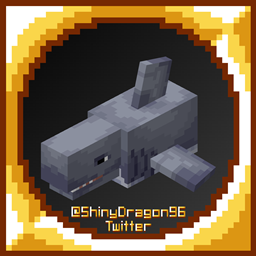
This resource pack turns dolphins into sharks inspired by Alex's Mobs. They didn't add a normal shark so I thought this would fit in. It is in their style with a mix of my own personal style and more! This was just a quick little 4-5 hour project and I really love how it turned out!
(This pack was based on the hammerhead shark in Alex's Mobs and parts of its textures were used in the pack as well. It's a great mod and I highly recommend checking it out!)

v04 Shiny's Sharks | 08-14-2022
MC 1.16-Snapshot, 1.17.1, 1.16.3, 1.13.1, 1.15-Snapshot, 1.16.1, 1.18.1, 1.14.4, 1.14.1, 1.17, 1.14.3, 1.15, 1.16, 1.13, 1.19-Snapshot, 1.16.5, 1.18.2, 1.19.2, 1.15.2, 1.14
Release 2022-08-14 Get
v03 Shiny's Sharks | 08-05-2022
MC 1.16-Snapshot, 1.17.1, 1.16.3, 1.13.1, 1.15-Snapshot, 1.16.1, 1.18.1, 1.14.4, 1.14.1, 1.17, 1.14.3, 1.15, 1.16, 1.13, 1.19-Snapshot, 1.16.5, 1.18.2, 1.19.2, 1.15.2, 1.14
Beta 2022-08-05 Get
v02 Shiny's Sharks | 04-15-2022
MC 1.16-Snapshot, 1.17.1, 1.16.3, 1.13.1, 1.15-Snapshot, 1.16.1, 1.18.1, 1.14.4, 1.14.1, 1.17, 1.14.3, 1.15, 1.16, 1.13, 1.19-Snapshot, 1.16.5, 1.18.2, 1.19.2, 1.15.2, 1.14
Alpha 2022-04-15 Get
v01 Shiny's Sharks | 02-21-2022
MC 1.16-Snapshot, 1.17.1, 1.16.3, 1.13.1, 1.15-Snapshot, 1.16.1, 1.18.1, 1.14.4, 1.14.1, 1.17, 1.14.3, 1.15, 1.16, 1.13, 1.19-Snapshot, 1.16.5, 1.18.2, 1.19.2, 1.15.2, 1.14
Alpha 2022-02-21 Get

Requirements & install

How to use this resource pack in Minecraft
Resolution
16x
Minecraft
1.16.3 – 1.19.2
Install folder
.minecraft/resourcepacks

How to install resource packs

  1. Download the resource pack .zip file (do not extract it).
  2. In Minecraft open Options → Resource Packs → Open Pack Folder.
  3. Drop the .zip into the resourcepacks folder (.minecraft/resourcepacks).
  4. Move the pack to the Selected column and click Done.
Browse more: 16x resource packs 32x resource packs 64x resource packs 128x resource packs 256x resource packs 512x+ resource packs Resource Packs for 1.19.2 All resource packs

More from ShinyDragon96

Advertisement Remove ads with Premium →

You Might Also Like