Mineuniverse
Resource Packs
Selected

Selected

RESOURCE PACK
An enhanced experience of selection
by Agente_511
Download Claim this project
739 downloads
0 likes
Updated Oct 14, 2026
0 hypes
16x Font Packs Miscellaneous
Advertisement Remove ads with Premium →

━━━━━━━━━━━━━━━━━━━━━━━━━━━━━━━━━━━━━━━━━━━━━━━━━━━━━━━━━━━━━━━━━━━

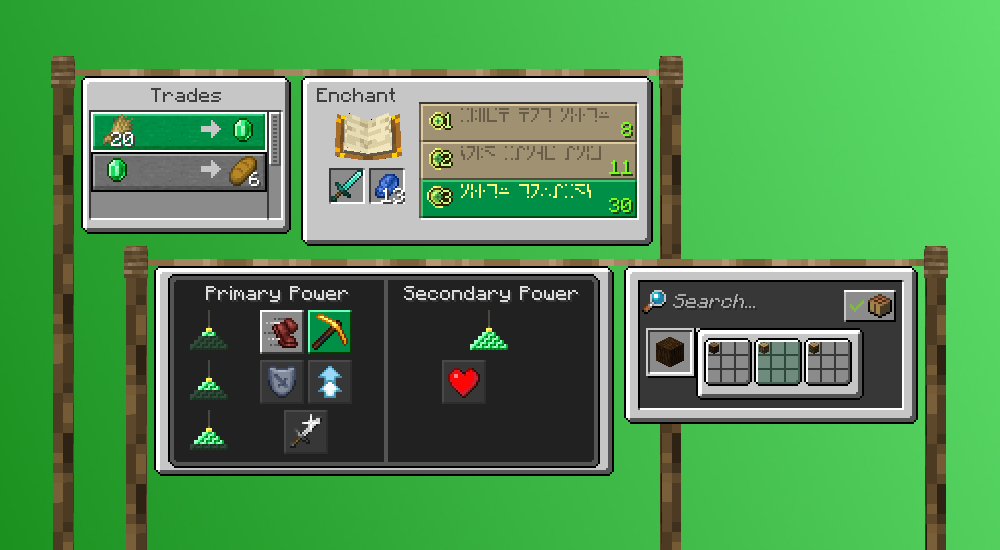
A greener solution for Minecraft button selection

Selected is a resource pack that enhances the way you see what is selected, adding more color and fixing Minecraft selection inconsistencies

Forget the times of the little white line around the button that if you got distracted you might not even realize what was selected!

Select all you want

The selection of all buttons is changed, not only the menu
━━━━━━━━━━━━━━━━━━━━━━━━━━━━━━━━━━━━━━━━━━━━━━━━━━

Selected-[V1.0].zip
MC 1.16-Snapshot, 1.17.1, 1.16.3, 1.15-Snapshot, 1.16.1, 1.18.1, 1.14.4, 1.14.1, 1.17, 1.14.3, 1.15, 1.16, 1.19-Snapshot, 1.16.5, 1.18.2, 1.19.2, 1.15.2, 1.14, 1.19.1
Release 2022-09-27 Get

Requirements & install

How to use this resource pack in Minecraft
Resolution
16x
Minecraft
1.16.5 – 1.19.2
Install folder
.minecraft/resourcepacks

How to install resource packs

  1. Download the resource pack .zip file (do not extract it).
  2. In Minecraft open Options → Resource Packs → Open Pack Folder.
  3. Drop the .zip into the resourcepacks folder (.minecraft/resourcepacks).
  4. Move the pack to the Selected column and click Done.
Browse more: 16x resource packs 32x resource packs 64x resource packs 128x resource packs 256x resource packs 512x+ resource packs Resource Packs for 1.19.2 All resource packs

More from Agente_511

Advertisement Remove ads with Premium →

You Might Also Like