Badges update automatically and link to the resource pack page on MineUniverse.
Sapped Armors
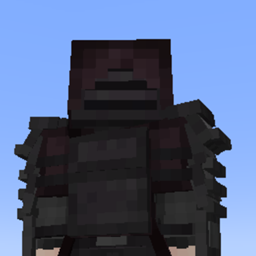
Sapped Armors replaces Minecraft’s flat armor textures with custom 3D models. The pack overhauls the geometry of every armor set to give your character a much more solid, heavily geared look.
3D Geometry: Adds actual thickness and depth to your gear. Features include layered shoulder pauldrons, heavy gauntlets, thick chest plating, and reinforced boots.
Unique Helmets: Every tier gets a completely reworked headpiece—ranging from open-faced hoods to full-face knight visors and gridded metal guards.
Layered Textures: Includes dark fabric underlays, visible straps, and distinct joint bands beneath the main armor plates.
Individual Tier Designs: Chainmail, Leather, Iron, Gold, Diamond, and Netherite each have their own unique visual style and silhouette rather than just being color swaps.
Upgrading your gear actually feels like an upgrade. Moving from basic iron to heavy diamond radically changes your character's silhouette, giving you a visible sense of becoming more powerful and protected.
Required Mods To make the 3D models and custom shapes work, you need to install these two mods:
EMF (Entity Model Features)
ETF (Entity Texture Features)
⚠️ Note: This pack will not work with standard vanilla Minecraft. You must have both EMF and ETF installed for the 3D armor to render correctly.