Thijquint’s Rock Crusher:
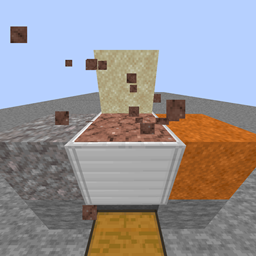
This datapack makes gravel, sand and red sand renewable with a Rock Crusher.
Latest version over on modrinth, click!
Make sure to get the resource pack located in the file!!!
Be sure to check out my other datapacks, including Invulnerable Allays, Teleport Allays and Duplicate Allays in 1.19.
Tutorial
To start off you need to craft a few things:
Craft a Resourse Manual like this:
___________________________
| Glass | Ink Sac | Glass |
| | Feather | |
| | Enchant Table | |
Craft a Redstone Clock like this:
_________________________________
| Stone | Repeater | Redstone dust |
| Stone | Repeater | Redstone dust |
| Iron Ingot | Iron Ingot | Iron Ingot |
Craft an Iron Piston like this:
______________________________
| Iron Ingot | Iron Ingot | Iron Ingot |
| Iron Block | Iron Ingot | Iron Block |
| Iron Block | Reds. Dust | Iron Block |
This Iron Piston functions like a normal piston, but it isn’t a polished feature, so I do not recommend using it.
Craft a Sieve like this:
________________________________
| Iron Ingot | Iron Nugget | Iron Ingot |
|Iron Nugget| Iron Ingot |Iron Nugget|
| Iron Ingot | Iron Nugget | Iron Ingot |
Finally, to craft the Rock Crusher, you need to get a fabricator by throwing your Recourse Manual onto the crafting table. Breaking the fabricator yields your Manuel and crafting table. In the fabricator:
______________________________________
| Reds. Clock | Iron Piston | lever |
| Iron Block | Sieve | Iron Block |
| Iron Ingot | Iron Ingot | Iron Ingot |
Now that you have your Rock Crusher, place it against a wall. I also recommend place hoppers above and below it, for automation. This datapack has custom hopper support. you do need to feed the hopper below into a chest, otherwise the items get lost, I aim to resolve this bug soon.
Recipes:
You can crush granite into sand, which takes three minutes.
You can crush cobblestone and cobbled deepslate into gravel, which takes one minute and 75 seconds respectively.
You can craft a Quick Sand Bucket (doesn’t have functionality) like this:
_____________________________________
| Clay | Sand | Iron Nugget |
|Blaze Powder|Water Bucket|Blaze Powder|
|Blaze Powder|Blaze Powder|Blaze Powder|
With the ferric Quick Sand Bucket, you can crush it into Red Sand, which takes 3 minutes
Lore:
- Logic would dictate that you can crush stone or gravel into sand, but minecraft stone is (most likely) too poor in silica to make suitable sand, so we use silica rich, but tough granite. This hypothetically too poor in silica based on a theory of mine.
- The rock crusher is a redstone machine that crushes rocks into smaller particles.
- Red sand is red because of rust. The quicksand you can craft has all the ingredients for the red sand. The mixture is crushed up and heated by the blaze powder to speed up the rusting.
- This datapack serves as an alternative to falling block dupers.
I hope to make many more tedious and impossible processes survival friendly in the future. You can leave well thought about suggestions in the comments.
If you encounter issues, leave a comment, and I'll try to address them when it suits me. If you don't know how to install datapacks, I recommend searching up a tutorial, it's very easy.
Thanks for reading!