Mineuniverse
Resource Packs
Revival AE

Revival AE

RESOURCE PACK
Reviving the Old Minecraft Nostalgia!
by DoktrPhil
Download Claim this project
24,993 downloads
0 likes
Updated Oct 14, 2026
0 hypes
16x Miscellaneous Traditional
Advertisement Remove ads with Premium →

Revival Alpha Edition 

--An Alpha Themed Resource Pack--


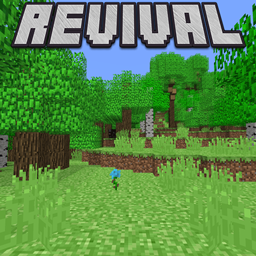
Revival is a resource pack inspired by the old versions of Minecraft, particularly the Beta versions, however Revival Alpha Edition, as you can guess, is based and inspired by the textures during the days of alpha. Right now other than the grass and foliage their aren't lots of differences between the main resource pack and this one, yet as time passes by and I continue to update it it will develop a unique identity different from the original Revival resource pack. Although a vast majority of the foliage is the same lime green, I tried to make it so there is some variation between biomes but still making sure its alpha themed. This resourcepack is in a somewhat early state, with some of the textures being beta themed instead of alpha themed, but that will undoubtedly change as I update and improve upon this resourcepack.


Recommended Settings

-Turn off Mipmapping

-Turn off smooth lighting

-Set your brightness to default or moody


-Never claim as your own, and no distributing

-Optifine is recommended

-Lightmap from Sencie's Old Lighting and Water Resource Pack


If you are more of a fan of the beta textures rather than the alpha textures, check out Revival


Revival Alpha Edition - 4.0 (Optifine Recommended!)
MC 1.21.4
Beta 2025-01-17 Get
Revival AE - 3.0.1 (Optifine Recommended!)
MC 1.21, 1.21.1-Snapshot, 1.21.1
Beta 2024-09-01 Get
Revival AE - 3.0 (Optifine Required!)
MC 1.21, 1.21.1-Snapshot, 1.21.1
Beta 2024-08-20 Get
Revival AE - 2.2 (Requires Optifine!)
MC 1.20.5, 1.20.6
Beta 2024-06-08 Get
Revival AE - 2.1 (Requires Optifine!)
MC 1.20.4
Beta 2024-02-06 Get
Revival AE - 2.0 (Requires Optifine!)
MC 1.20.4
Beta 2024-01-27 Get
Revival AE - 1.0 (Requires Optifine!)
MC 1.20.1
Beta 2023-12-30 Get

Requirements & install

How to use this resource pack in Minecraft
Resolution
16x
Minecraft
1.20.1 – 1.21.4
Install folder
.minecraft/resourcepacks

How to install resource packs

  1. Download the resource pack .zip file (do not extract it).
  2. In Minecraft open Options → Resource Packs → Open Pack Folder.
  3. Drop the .zip into the resourcepacks folder (.minecraft/resourcepacks).
  4. Move the pack to the Selected column and click Done.
Browse more: 16x resource packs 32x resource packs 64x resource packs 128x resource packs 256x resource packs 512x+ resource packs Resource Packs for 1.21.4 All resource packs

More from DoktrPhil

Advertisement Remove ads with Premium →

You Might Also Like