Mineuniverse
Resource Packs
Rainbow Note Blocks

Rainbow Note Blocks

RESOURCE PACK
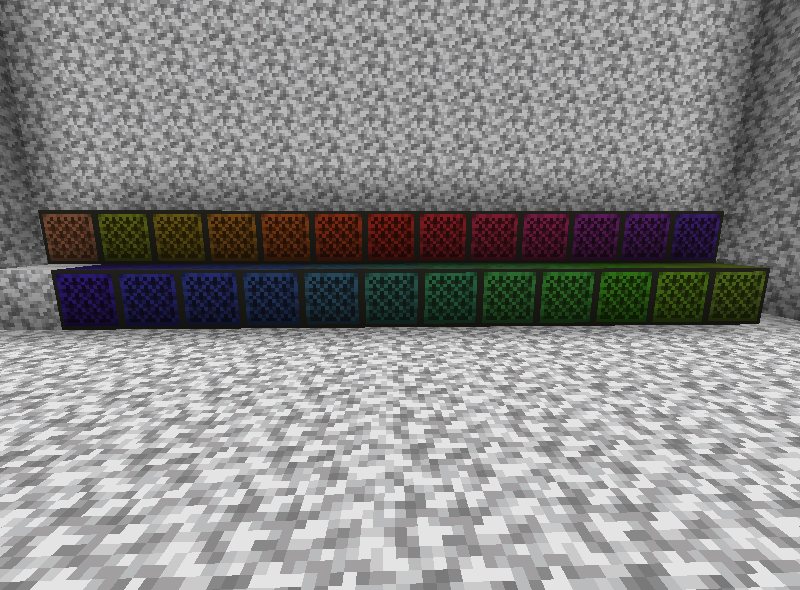
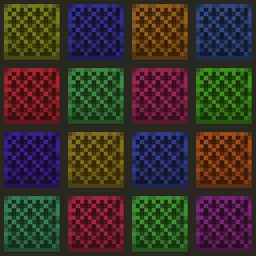
Note Blocks will match the color of the note they're tuned to! Default is unchanged.
by beeshroom
Download Claim this project
838 downloads
0 likes
Updated Oct 14, 2026
0 hypes
16x Miscellaneous
Advertisement Remove ads with Premium →

With this Resource Pack installed Note Blocks will change textures to match the color of the Note particle they emit.

This pack doesn't necessarily provide any help when it comes to composing Note Block melodies, but it might at least add some visual flair. 

It should be compatible with mods that add custom Note Block instrument sounds since it only changes color based on Note, not on Instrument type.

Full credit to Jappa for the default Note Block texture that all the textures in this resource pack are built upon.

rainbow noteblock.zip
MC 1.16.5
Release 2021-08-30 Get

Requirements & install

How to use this resource pack in Minecraft
Resolution
16x
Minecraft
1.16.5
Install folder
.minecraft/resourcepacks

How to install resource packs

  1. Download the resource pack .zip file (do not extract it).
  2. In Minecraft open Options → Resource Packs → Open Pack Folder.
  3. Drop the .zip into the resourcepacks folder (.minecraft/resourcepacks).
  4. Move the pack to the Selected column and click Done.
Browse more: 16x resource packs 32x resource packs 64x resource packs 128x resource packs 256x resource packs 512x+ resource packs Resource Packs for 1.16.5 All resource packs

More from beeshroom

Advertisement Remove ads with Premium →

You Might Also Like